Computer Networks · Module 3 — Layered Models
The OSI model: a tour of all 7 layers
OSI (Open Systems Interconnection) is a reference model — a shared vocabulary, published so that everyone describes networking the same way.
Sign in to track your score
Interviewers love asking "which layer does a router work at?" There is exactly one list you need for that question, and this is it.
Why & what
Why OSI exists. OSI (Open Systems Interconnection) is a reference model — a shared vocabulary, published so that everyone describes networking the same way.
It is not code. Nothing on your laptop is "running OSI". It is the map everyone points at while arguing.
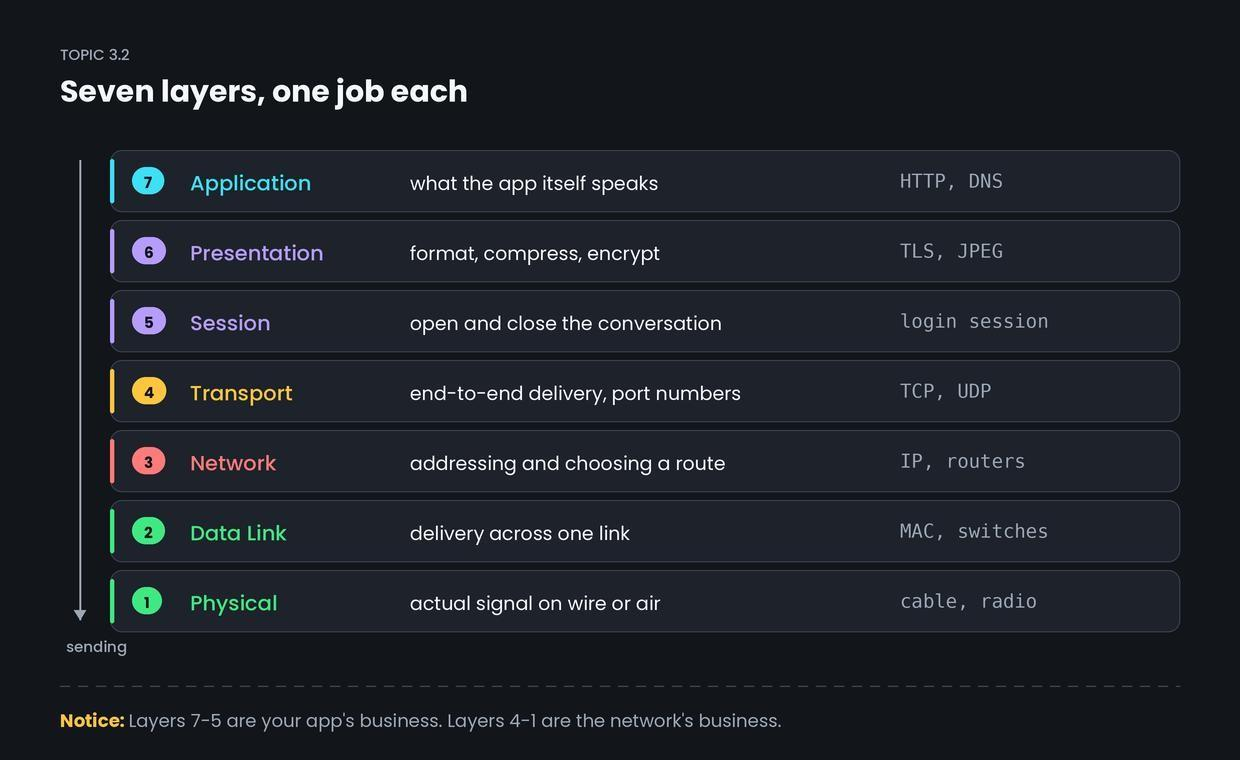
What the seven layers are. Top to bottom, which is the order data travels when you send.
7 Application. What the app itself speaks. HTTP, DNS, SMTP. This is not your browser; it is the language your browser uses.
6 Presentation. Formatting so both sides read data the same way. Encryption (TLS), compression, character encoding, JPEG.
5 — Session. Starting, maintaining and closing a conversation between two machines.
4 — Transport. End-to-end delivery. Splits data into pieces, uses port numbers to reach the right app, and (with TCP) checks that nothing was lost. TCP and UDP live here.
3 — Network. Addressing across networks and choosing a route. IP lives here. Routers work at this layer.
2 — Data Link. Delivery across one single link, using MAC addresses, plus an error check.
Switches work at this layer.
1 Physical. The actual signal voltage on copper, light in fibre, radio in air. Cables, connectors, hubs.
The mnemonic, top down: All People Seem To Need Data Processing.
The two layers people mix up. Layer 3 and Layer 4 both sound like "delivery", so keep them apart like this.
- Layer 3 asks: which machine, and how do I get there? It works with IP addresses and hops between routers.
- Layer 4 asks: which app on that machine, and did it all arrive? It works with port numbers and, in TCP, with acknowledgements.
203.0.113.10 is Layer 3. Port 443 is Layer 4. Same journey, two different questions.
A trick for any "which layer" question. Ask what the thing is addressed with.
- Addressed with a MAC address → Layer 2.
- Addressed with an IP address → Layer 3.
- Addressed with a port number → Layer 4.
- Not addressed at all, just a signal → Layer 1.
- Human-readable, like a URL or an email → Layer 7.
Device to layer, the version interviews want:
- Hub, cable, repeater → Layer 1
- Switch, NIC → Layer 2
- Router → Layer 3
- Firewall → Layer 3 or 4, and modern ones go up to 7
How it works
Aisha's request, going down her side of the stack.
- Layer 7 builds the request: get /results from college.edu.
- Layer 6 encrypts it, because the site uses HTTPS.
- Layer 4 cuts it into pieces and stamps the destination port, 443.
- Layer 3 adds the addresses: from 192.168.1.42, to 203.0.113.10.
- Layers 2 and 1 wrap it for the hop to the router and push it out as a radio signal.
At college.edu, the same five steps happen in reverse order, bottom to top.
Common confusion
Students think data passes through seven separate programs on the way out. Actually, layers 7, 6 and 5 are usually the same program.
Your browser handles the HTTP request, the TLS encryption and the session, all inside itself. The operating system handles layers 4 and 3. The network card and driver handle 2 and 1. OSI describes seven jobs, not seven pieces of software. That is why the real world uses a four-layer model instead — which is the next topic.
Interview angle
Asked as: "Explain the OSI model" or, far more often, "Which layer does a switch/router/firewall work at?"
Model answer:
OSI is a seven-layer reference model that describes how data moves from an application on one machine to an application on another. From the top: Application is the protocol the app speaks like HTTP. Presentation handles formatting and encryption. Session opens and closes the conversation. Transport gives end-to-end delivery using port numbers, TCP and UDP. Network handles IP addressing and routing. Data Link moves frames across one link using MAC addresses. Physical is the actual signal. For devices: hubs are Layer 1, switches Layer 2, routers Layer 3. It is a teaching model, not what actually runs — real stacks follow TCP/IP.
- 1.
A router operates mainly at which OSI layer?
- 2.
Port numbers are the business of which layer?
- 3.
MAC addresses are used at which layer?
- 4.
Which statement about OSI is correct?