Computer Networks · Module 1 — Foundations: Why Networks Exist
Meet the case study
Every module from here adds a new device or a new rule. Fresh examples each time means memorising eight unrelated stories. One shared journey means each new idea clicks into a place you already know.
Most people learn networking as forty disconnected definitions, then forget all forty. We are going to learn it as one sentence instead, and spend eight modules zooming into it.
Why & what
Why one story. Every module from here adds a new device or a new rule. Fresh examples each time means memorising eight unrelated stories. One shared journey means each new idea clicks into a place you already know.
The story.
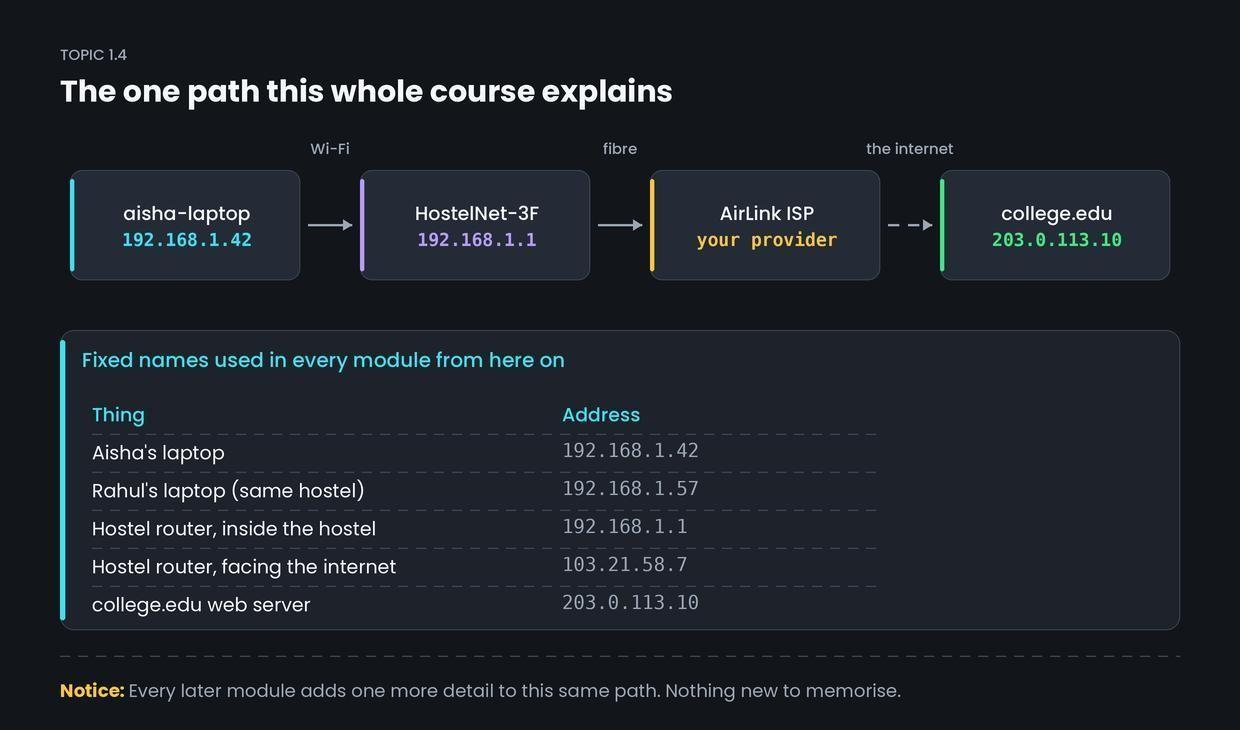
Aisha is in her hostel room. She opens her laptop, joins the hostel Wi-Fi, and loads college.edu. That is the whole course.
The fixed names. These never change:
| Thing | Address |
|---|---|
| Aisha's laptop | 192.168.1.42 |
| Rahul's laptop (same hostel) | 192.168.1.57 |
| Hostel router, inside the hostel | 192.168.1.1 |
| Hostel router, facing the internet | 103.21.58.7 |
| college.edu web server | 203.0.113.10 |
The hostel Wi-Fi network is called HostelNet-3F. The internet provider is AirLink.
Note the router has two addresses. One faces the hostel, one faces the world. That will matter a lot in Module 5.
How it works
Here are the five questions this journey raises. Each one is a module.
- Aisha's laptop has no address when she walks in. How does it get 192.168.1.42? → Module 7 (DHCP)
- She typed a name, not a number. How does college.edu become 203.0.113.10? → Module 7 (DNS)
- Her data must first cross the hostel to the router. How? → Module 4 (MAC, switching, ARP)
- From the router, how does it find one server among billions? → Module 5 (IP and routing)
- How does the page arrive complete, in order, with nothing lost? → Module 6 (TCP)
Common confusion
Students think each module is a separate topic to be memorised on its own. Actually, every module is one more zoom level on this single path.
Interviews test it the same way. "What happens when you type a URL?" is not a new question at the end — it is this path, told in order.
Interview angle
Asked as: "What happens when you type a URL into a browser and press Enter?" — the single most common networking interview question there is.
You cannot fully answer it yet. Here is the skeleton you will fill in as we go:
The browser resolves the name to an IP address using DNS. It opens a TCP connection to that IP on port 443. It sends an HTTP request over that connection. The data leaves as packets, hops through routers to reach the server. The server sends the page back and the browser renders it. Five lines. By Module 9 you will expand each into a minute of detail.