Computer Networks · Module 4 — Physical & Data Link Layer
Ethernet and how a switch learns
Ethernet is the set of rules for sending frames over a wired local network. It has won completely — practically every wired LAN on earth uses it, and Wi-Fi deliberately copies its frame format so the two mix easily.
Sign in to track your score
Plug a brand new switch into the hostel network. Nobody configures it. Within seconds it knows exactly which laptop is on which port.
Why & what
Why Ethernet. Ethernet is the set of rules for sending frames over a wired local network. It has won completely — practically every wired LAN on earth uses it, and Wi-Fi deliberately copies its frame format so the two mix easily.
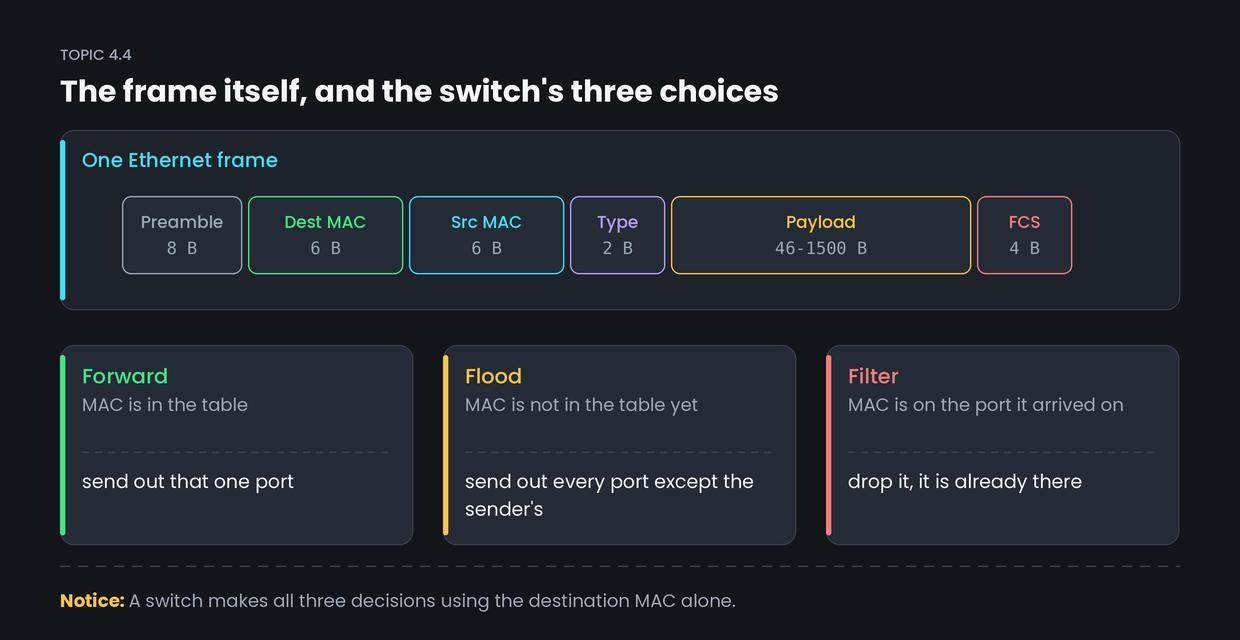
What is inside an Ethernet frame. You saw the shape in Topic 3.4. Here are the real fields.
- Preamble (8 bytes) — a fixed pattern that lets the receiver's clock lock on. Not really data.
- Destination MAC (6 bytes) — who this frame is for. This is the field the switch reads.
- Source MAC (6 bytes) — who sent it. This is the field the switch learns from.
- Type (2 bytes) — what is inside. 0x0800 means an IPv4 packet, 0x0806 means ARP.
- Payload (46 to 1500 bytes) — the packet handed down from the network layer. 1500 is the MTU, the largest payload allowed.
- FCS (4 bytes) — the CRC trailer from Topic 4.2.
Three kinds of destination.
- Unicast — one specific MAC address.
- Broadcast — FF:FF:FF:FF:FF:FF, everyone on the network.
- Multicast — a group of interested devices only.
How it works
The switch has exactly three possible decisions for any arriving frame.
- It reads the source MAC and records it against the port the frame came in on. This is how the table fills. It happens on every single frame.
- It reads the destination MAC and looks it up in the table.
- Found, on a different port → forward it out of that one port only.
- Not found, or it is a broadcast → flood it out of every port except the one it arrived on.
- Found, on the same port it arrived on → filter it, meaning drop it. The destination is already on that side.
Table entries expire after a few minutes, so a laptop that moves rooms gets relearned.
Common confusion
Students think the switch learns from the destination address. Actually, it learns from the source address and decides using the destination.
That distinction is the whole mechanism. A switch cannot learn where a device is until that device sends something. This is exactly why the very first frame to an unknown device has to be flooded — and why the reply immediately teaches the switch where that device lives.
Interview angle
Asked as: "How does a switch build its MAC address table?" or "What is the MTU?" The first one is a favourite because sloppy answers say "it learns destinations".
Model answer:
When a frame arrives, the switch reads the source MAC address and records it in its MAC address table against the port it arrived on. That is how the table is built from source addresses, automatically, with no configuration. To forward, it looks up the destination MAC. If it is in the table it forwards out of that port only. If it is unknown or is a broadcast, it floods out of all ports except the incoming one. If the destination is on the same port it arrived on, it filters the frame. Entries age out after a few minutes so devices can move. An Ethernet frame carries a payload of 46 to 1500 bytes; 1500 is the standard MTU.
- 1.
A switch builds its MAC address table by reading the
- 2.
A frame arrives for a MAC address not in the table. The switch
- 3.
What is the standard Ethernet MTU?
- 4.
Why do MAC table entries expire after a few minutes?