Computer Networks · Module 7 — Application Layer
DHCP
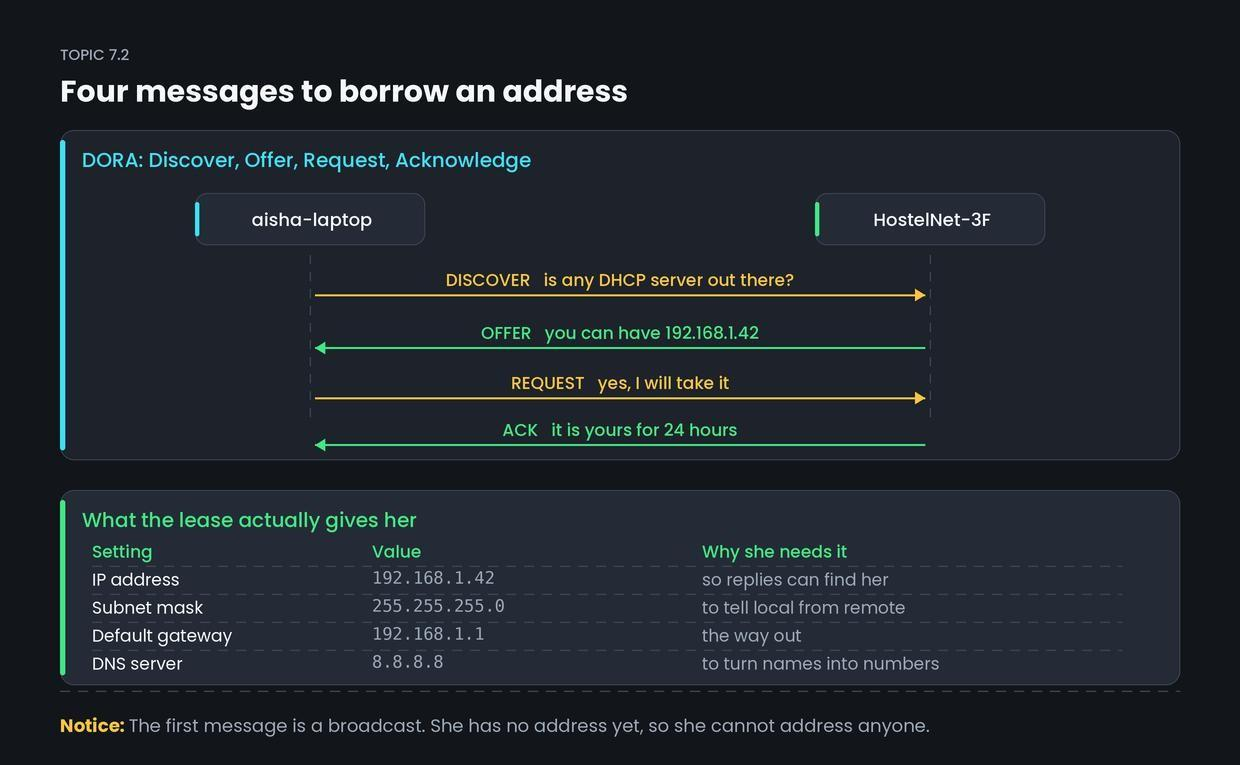
Every device needs four settings before it can do anything useful: an IP address, a subnet mask, a default gateway and a DNS server.
Sign in to track your score
Aisha connects to HostelNet-3F for the first time. Two seconds later she has an IP address, a mask, a gateway and a DNS server. She typed none of them.
Why & what
Why DHCP exists. Every device needs four settings before it can do anything useful: an IP address, a subnet mask, a default gateway and a DNS server.
Setting those by hand would mean the warden configuring forty laptops, keeping a register so nobody gets a duplicate address, and redoing it every time a student leaves. Unworkable.
What DHCP is. DHCP (Dynamic Host Configuration Protocol) hands out those settings automatically when a device joins a network.
The four settings together are called a lease, because they are borrowed for a fixed time, not owned. When Aisha leaves for the holidays, her lease expires and the address goes back into the pool for someone else.
The four messages: DORA.
- Discover — is any DHCP server out there?
- Offer — yes, you can have this address.
- Request — I will take it.
- Acknowledge — it is yours, for this long.
DHCP runs over UDP, on port 67 for the server and port 68 for the client.
How it works
- Aisha's laptop joins the Wi-Fi with no IP address at all. It broadcasts a DISCOVER to 255.255.255.255, because it cannot address anyone specifically yet.
- The DHCP server — inside the hostel router — replies with an OFFER of 192.168.1.42, plus the mask, gateway and DNS server.
- Her laptop broadcasts a REQUEST, formally accepting that offer.
- The server sends an ACK confirming the lease and its duration, and marks the address as taken so nobody else is offered it.
- Partway through the lease, her laptop quietly asks to renew. If she stays all term, she keeps the same address the whole time.
Common confusion
Students think the third message is unnecessary — why request what was already offered? Actually, REQUEST exists because there might be more than one DHCP server.
If two servers hear the DISCOVER, Aisha receives two OFFERs. She broadcasts her REQUEST naming which one she accepted, so the winning server marks the address as taken and the losing server puts its offer back in the pool. Without that step, addresses would be reserved and never claimed.
A second small mix-up: DISCOVER is broadcast because Aisha has no address yet. She cannot address a specific server, and cannot be replied to directly.
Interview angle
Asked as: "Explain DHCP" or "What is the DORA process?" Naming all four steps and what the lease contains is the full-marks answer.
Model answer:
DHCP automatically assigns network configuration to a device when it joins. It uses four messages, known as DORA. The client broadcasts a Discover, because it has no address yet. A server replies with an Offer containing a candidate IP address. The client broadcasts a Request accepting one specific offer, which matters when multiple DHCP servers responded. The server sends an Acknowledge confirming the lease and its duration. The lease includes the IP address, subnet mask, default gateway and DNS server address — not just the IP. Leases are time-limited and renewed automatically, so addresses return to the pool when devices leave. It runs over UDP, port 67 on the server side and 68 on the client side.
- 1.
What does DORA stand for?
- 2.
Why is the first DHCP message a broadcast?
- 3.
Besides an IP address, what else does a DHCP lease normally include?
- 4.
Why does the client send a REQUEST after receiving an OFFER?