Computer Networks · Module 2 — Network Types, Topologies & Devices
NIC, hub and switch
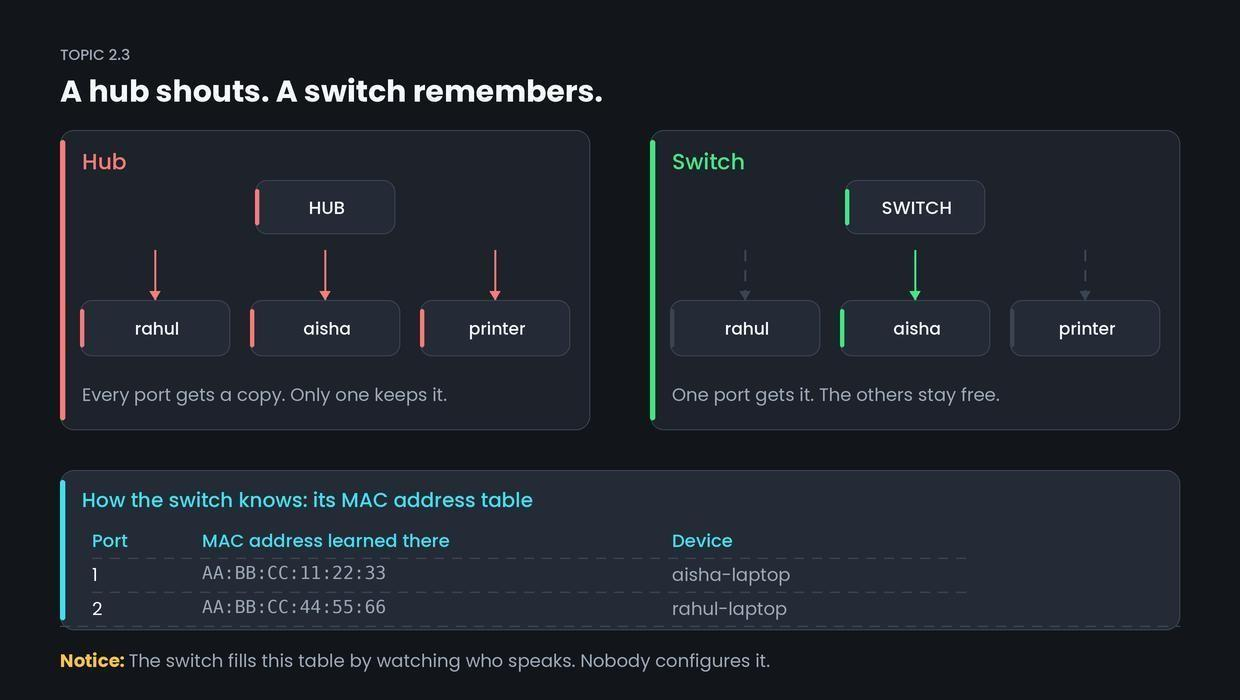
The first middle devices were hubs, and a hub is very simple. Anything arriving on one port is copied to every other port.
Sign in to track your score
Aisha sends a file to Rahul. Should the printer, the warden's PC and forty other laptops also receive a copy of it?
Why & what
Why the switch was invented. The first middle devices were hubs, and a hub is very simple. Anything arriving on one port is copied to every other port.
That causes three problems.
- Waste. Forty devices receive data meant for one.
- Collisions. If two devices talk at once, the signals clash and both must resend.
- No privacy. Every machine sees traffic that was not for it.
So we needed a middle device that could tell who is where.
What each device is.
- NIC (Network Interface Card) — the chip inside your laptop that connects it to the network. Every NIC has a MAC address: a permanent hardware address burnt in at the factory, written like AA:BB:CC:11:22:33. Module 4 covers it fully.
- Hub — copies incoming data to every port. No memory, no decisions.
- Switch — keeps a table of which MAC address sits on which port, and sends data only to the correct port.
How it works
Here is how the switch builds that table, with no configuration from anyone.
- Aisha's laptop sends a frame. The switch notes: AA:BB:CC:11:22:33 is on port 1.
- The switch does not yet know where Rahul is, so this once it copies the frame to all ports.
- Rahul replies. The switch notes: AA:BB:CC:44:55:66 is on port 2.
- From now on, anything for Rahul goes out of port 2 only. Nobody else sees it.
- Entries expire after a few minutes, so a laptop that moves rooms is relearned.
Common confusion
Students think a hub is just a slower switch. Actually, a hub is not a weaker version of a switch — it behaves differently.
A hub copies your data to every machine on the network. That is not only slow, it means any laptop could read traffic meant for someone else. A switch sends each frame down one port only. Hubs are effectively extinct in real equipment. They survive in exams and interview questions.
Interview angle
Asked as: "Difference between a hub and a switch?" Extremely common. They are checking whether you know a switch learns.
Model answer:
A hub is a simple repeater. Whatever comes in one port is copied to every other port, so bandwidth is shared, collisions happen, and every device sees traffic that was not meant for it. A switch learns which MAC address is on which port by watching incoming frames, stores that in a MAC address table, and forwards each frame only to the correct port. The result is more usable bandwidth, fewer collisions, and better privacy. A hub works at the physical layer, a switch at the data link layer.
- 1.
A switch decides where to send a frame using
- 2.
A switch receives a frame for a device it has never seen. It
- 3.
Which is a real disadvantage of a hub?
- 4.
How does a switch's MAC address table get filled?