Computer Networks · Module 4 — Physical & Data Link Layer
MAC addresses
You already met IP addresses. So why does a device need another one?
Sign in to track your score
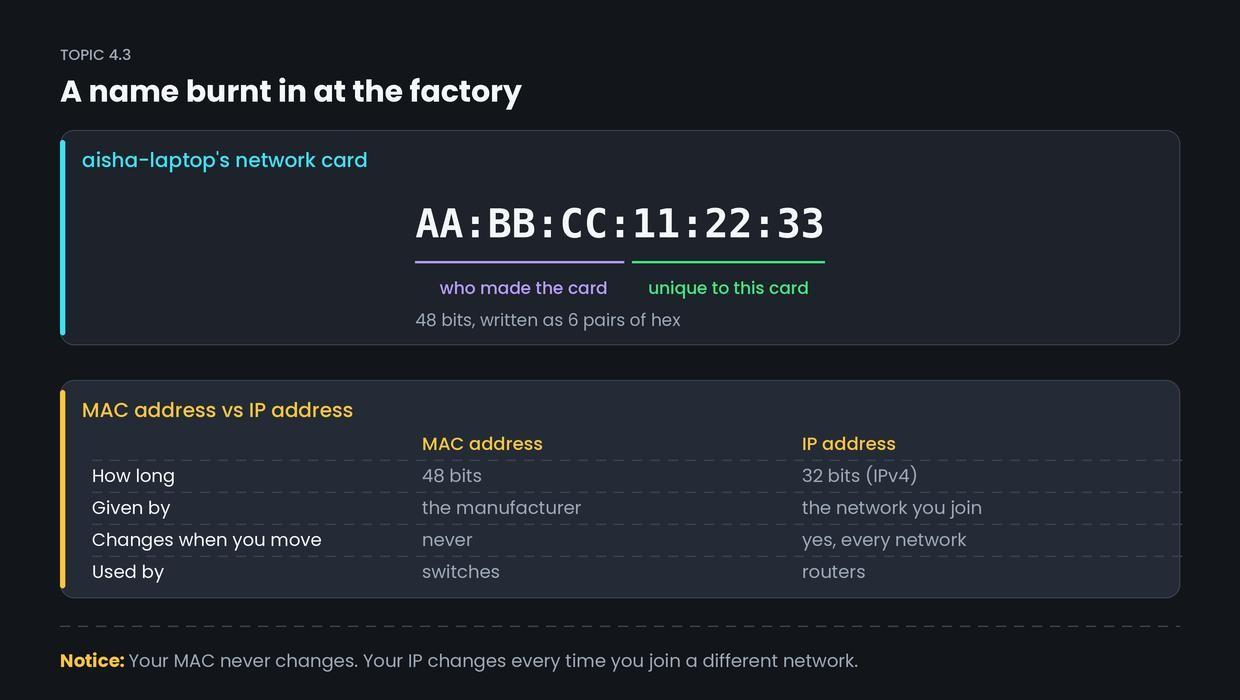
Aisha's laptop has had the same MAC address since it left the factory. It will still have it after she changes her IP, her Wi-Fi, her city and her country.
Why & what
Why a second kind of address exists. You already met IP addresses. So why does a device need another one?
Because they answer different questions.
- An IP address says which network, and roughly where in the world. It changes when you move.
- A MAC address says which exact card, right here on this link. It never changes.
A frame crossing the hostel needs a name for the machine sitting a few metres away. That is the MAC address.
What a MAC address is. A MAC address (Media Access Control address) is a 48-bit number burnt into the network card at manufacture. It is written as six pairs of hex digits:
AA:BB:CC:11:22:33.
It has two halves.
- First 3 bytes — the OUI (Organisationally Unique Identifier). This identifies the manufacturer. Every Dell card starts with a Dell code.
- Last 3 bytes — a serial number the manufacturer assigns, unique within their own range.
Together, no two cards in the world should share one.
One special address. FF:FF:FF:FF:FF:FF is the broadcast address. A frame sent to it is delivered to every device on the local network. You will need this in Topic 4.5.
How it works
- The manufacturer is given an OUI block by the IEEE, the standards body.
- It burns OUI plus a serial number into each card it makes.
- When the card sends a frame, it writes its own MAC as the source.
- Every card on the link reads the destination MAC of every frame that reaches it.
- If the destination is not its own MAC and not the broadcast address, the card ignores the frame.
Common confusion
Students think a MAC address can be used to find a device anywhere on the internet.
Actually, MAC addresses only work inside one local network. They never travel across a router.
When Aisha's frame reaches the hostel router, the router strips the frame off completely and builds a brand new one for the next hop, with new MAC addresses. Her AA:BB:CC:11:22:33 never leaves HostelNet-3F. The IP addresses stay the same the whole journey. The MAC addresses are rewritten at every hop.
Interview angle
Asked as: "Difference between a MAC address and an IP address?" This is asked constantly, and the answer above about hops is what separates a good answer from a memorised one.
Model answer:
A MAC address is a 48-bit physical address burnt into the network card by the manufacturer, written as six hex pairs. An IP address is a 32-bit logical address, assigned by the network you are currently connected to. The MAC identifies a specific card and never changes. The IP identifies your position in a network and changes whenever you join a different one. MAC is used by switches at layer 2, IP by routers at layer 3. The important part is scope: MAC addresses are local only. At every hop the frame is rebuilt with new MAC addresses, while the source and destination IP stay the same end to end.
- 1.
How long is a MAC address?
- 2.
What do the first three bytes of a MAC address identify?
- 3.
Aisha's frame passes through the router towards college.edu. Her MAC address
- 4.
FF:FF:FF:FF:FF:FF means