Computer Networks · Module 2 — Network Types, Topologies & Devices
Router, modem, access point and default gateway
A switch is brilliant inside one network. It knows every device on HostelNet-3F. But college.edu at 203.0.113.10 is not on HostelNet-3F.
Sign in to track your score
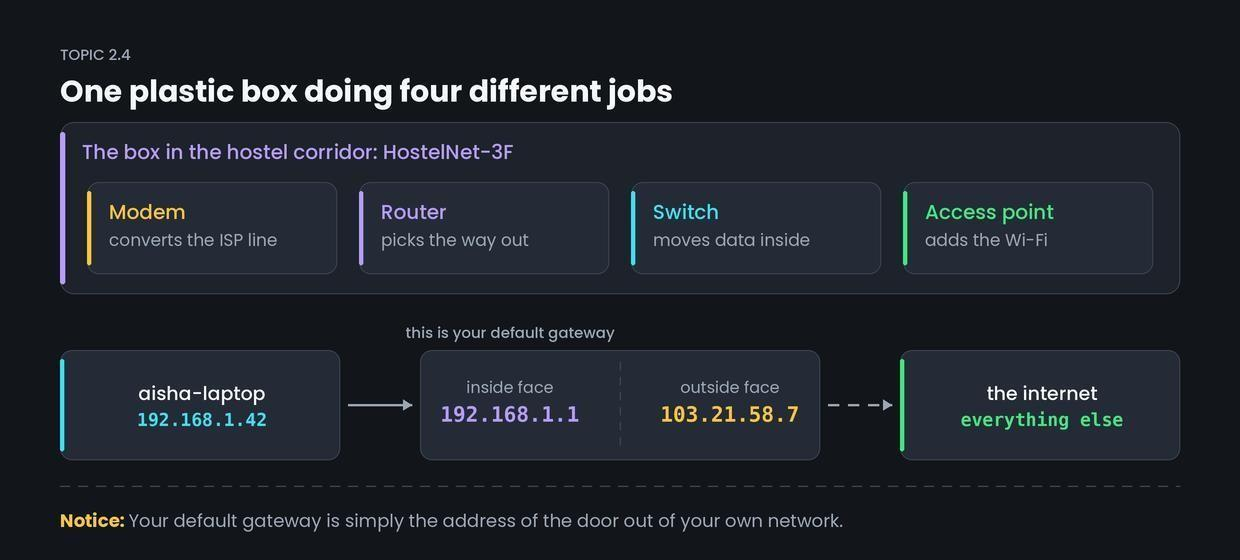
There is one plastic box in the hostel corridor with blinking lights. People call it "the router", "the modem" and "the Wi-Fi" — all for the same box. All three names are partly right.
Why & what
Why a router exists. A switch is brilliant inside one network. It knows every device on HostelNet-3F. But college.edu at 203.0.113.10 is not on HostelNet-3F. The switch has no idea where it is, and it cannot learn, because there are billions of addresses out there.
So we need a device whose whole job is: this is not local — here is the way out.
What each part is.
- Router — connects two different networks and decides which way a packet should leave. It works with IP addresses, not MAC addresses.
- Modem — converts your data into the form your ISP's line carries, and back again. Fibre, cable and DSL each need this translation.
- Access point (AP) — provides Wi-Fi. It turns data into radio and back.
- Default gateway — the address a device sends anything non-local to. For Aisha, that is 192.168.1.1.
That corridor box is all four in one plastic shell. Cheap for you, confusing for exams.
Two faces, two addresses. The box has an address on each side.
- Inside, facing the hostel: 192.168.1.1
- Outside, facing AirLink: 103.21.58.7
How it works
Aisha's packet is addressed to 203.0.113.10. Here is its exit.
- Her laptop compares 203.0.113.10 with its own network. Not local.
- So it hands the packet to its default gateway, 192.168.1.1. It does not need to know the route — only the door.
- The router checks its routing table: a list of destinations and which line leads towards each. It picks the outgoing line.
- The modem converts the packet into the signal AirLink's line carries.
- The packet leaves the hostel showing 103.21.58.7 as the sender, so the reply knows how to come back. How that swap works is NAT, in Module 5.
Common confusion
Students think "router" and "Wi-Fi" mean the same thing. Actually, the access point provides Wi-Fi. The router only chooses paths.
A router with no access point still works perfectly over cables — that is how most offices run. And an access point with no router gives you Wi-Fi that reaches other devices in the building but cannot reach the internet, because nothing is choosing the way out. They live in one box at home. They are two separate jobs.
Interview angle
Asked as: "Difference between a switch and a router?" or "What is a default gateway?" This pair comes up in almost every networking round.
Model answer:
A switch forwards data inside a single network using MAC addresses. A router connects different networks and forwards packets between them using IP addresses, choosing a path from its routing table. The default gateway is the address a device sends any non-local traffic to — normally the router's address on your own network. My laptop only needs to know the door out, not the full route. A modem is separate again: it converts data into the form the ISP's line carries. Home boxes combine modem, router, switch and access point, which is why people use the names loosely.
- 1.
A router forwards data using
- 2.
Aisha's laptop wants to reach 203.0.113.10. It sends the packet first to
- 3.
Which job does an access point do?
- 4.
Why does the hostel router have two IP addresses?