Computer Networks · Module 7 — Application Layer
DNS
Packets can only be addressed to numbers. But people cannot remember numbers, and the numbers change — a college can move hosting and get a new IP tomorrow.
Sign in to track your score
Aisha typed college.edu. Every module since has used 203.0.113.10. Nobody has explained who did the swap.
Why & what
Why DNS exists. Packets can only be addressed to numbers. But people cannot remember numbers, and the numbers change — a college can move hosting and get a new IP tomorrow.
So we need a phone book. But a single phone book for the whole internet is impossible.
- It would be enormous.
- It would change thousands of times a second.
- Every lookup on earth would hit one machine.
The answer is to split it up, and let each organisation keep its own small piece.
What DNS is. DNS (Domain Name System) turns a name into an IP address, using a tree of servers where each one knows only its own part.
The parts of results.college.edu, read right to left:
- . — the root, at the far right, usually invisible
- edu — the TLD (Top Level Domain)
- college — the domain
- results — a subdomain or host
The players.
- Resolver — the server that does the work for you, usually run by your ISP or a public one like 8.8.8.8. Aisha's laptop got its address from DHCP.
- Root servers — know which server handles each TLD.
- TLD servers — know which server handles each domain in that TLD.
- Authoritative server — actually owns the answer for that domain.
Record types worth knowing: A (name to IPv4), AAAA (name to IPv6), CNAME (this name is an alias for that one), MX (mail server for this domain), NS (which server is authoritative).
How it works
- Aisha's browser checks its own cache, then the operating system's cache. If either has college.edu, it stops here.
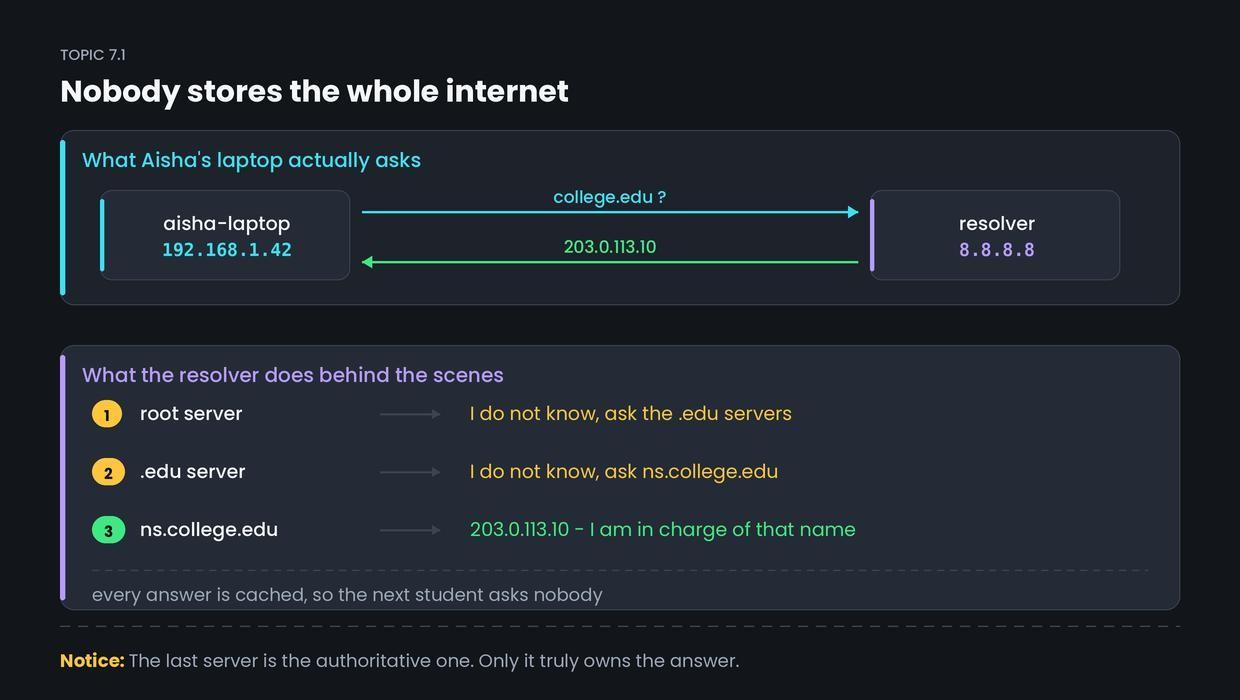
- Otherwise it asks the resolver at 8.8.8.8: what is the address for college.edu?
- The resolver asks a root server. Root replies: I do not know, but the .edu servers do — here they are.
- The resolver asks the .edu server. It replies: I do not know, but ns.college.edu is authoritative — here it is.
- The resolver asks ns.college.edu, gets 203.0.113.10, caches it, and returns it to Aisha.
DNS normally uses UDP on port 53, because the exchange is one small question and one small answer. Setting up a TCP connection would cost more than simply asking again if the reply goes missing.
Common confusion
Students think the DNS server fetches the web page. Actually, DNS only returns an address. It never touches the page.
The two are completely separate conversations. First Aisha's laptop talks to 8.8.8.8 over UDP port 53 and receives twelve bytes of answer. That connection ends. Only then does it open a brand new TCP connection to 203.0.113.10 on port 443 and ask for the page.
DNS is directory enquiries. It gives you the number and hangs up.
Interview angle
Asked as: "How does DNS work?" and "Does DNS use TCP or UDP?" The second is a trap — the honest answer has a "but".
Model answer:
DNS maps domain names to IP addresses using a hierarchy of servers, so no single machine has to store the whole internet. The client asks a resolver. If the resolver has no cached answer, it queries a root server, which points it to the TLD servers for .edu. The TLD server points to the authoritative server for that domain, which returns the actual A record. The resolver caches the result and returns it. DNS uses UDP on port 53 for normal lookups, because a query and reply are small and retrying is cheaper than a handshake. It falls back to TCP for large responses and for zone transfers between servers. Caching happens at every level — browser, operating system and resolver — so most lookups never reach the root at all.
- 1.
Which port and protocol does a normal DNS lookup use?
- 2.
Which server actually owns the answer for college.edu?
- 3.
Reading results.college.edu, which part is the TLD?
- 4.
After DNS returns 203.0.113.10, what does the browser do next?