DBMS · Module 5 — SQL
Subqueries & Set Operations
A subquery runs first and hands its answer to the outer query, while UNION, INTERSECT and EXCEPT stack two result lists that must share the same column shape.
Sign in to track your score
"Show me students who scored above the class average."
You can't write that in one pass. You don't know the average until you've looked at every row — but you need the average to decide which rows to keep.
You need an answer before you can ask your question.
Why & what
That's exactly what a subquery does. It runs first, produces an answer, and hands it up to the query that needed it.
A subquery is a query written inside another query. The inner one runs first, and its result is used by the outer one.
And a related tool: set operations stack two separate result lists into one — UNION, INTERSECT and EXCEPT.
How it works
Question: show the names of students taking DBMS 101. Names live in Student, enrollments live in Enrollment.
- Write the inner question first. Who's in DBMS 101? SELECT roll_no FROM Enrollment WHERE course = 'DBMS101' → gives 101, 102.
- Feed it upward with IN.
SELECT name FROM Student
WHERE roll_no IN (SELECT roll_no FROM Enrollment WHERE course = 'DBMS101');
The database runs the inside, gets (101, 102), and the outer query becomes a plain WHERE roll_no IN (101, 102).
- Know the three shapes a subquery returns.oOne value — use with =: WHERE grade > (SELECT AVG(grade) FROM ...) oA list of values — use with IN, as above oA whole table — use in the FROM clause, as a temporary table
- Now set operations. These stack two finished result lists: oUNION — everything from both, duplicates removed (UNION ALL keeps duplicates and is faster) oINTERSECT — only what appears in both oEXCEPT — in the first list but not the second
- The one rule for all three. Both lists must have the same number of columns, in the same order, with matching types. Names don't have to match; shapes do.
Pause here. You want students enrolled in DBMS 101 but not OS 101. Which tool — a join, a subquery, or a set operation?
Any of the three works, but EXCEPT reads most directly: the DBMS101 list, EXCEPT the OS101 list.
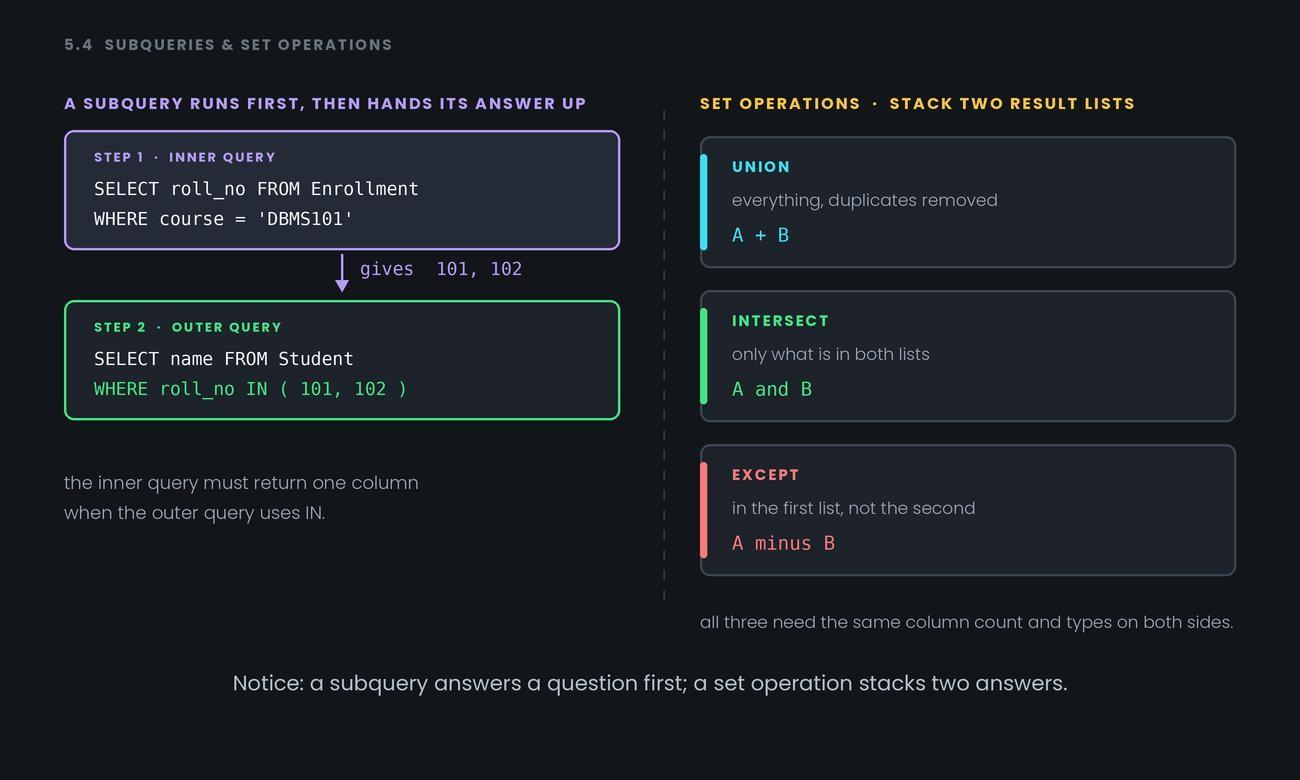
Notice: a subquery answers a question first; a set operation stacks two answers.
Common confusion
Subquery vs join — people think one must be "correct." Often both work, and modern databases optimise them into the same plan. Pick by readability: joins when you need columns from both tables in the output, subqueries when you only need a filter condition. In the example above, we wanted names only, never enrollment columns — so the subquery reads better.
Second: NOT IN and NULL are a trap. If the subquery returns even one NULL, NOT IN returns no rows at all — because "is this value not equal to unknown" can never be answered true. NOT EXISTS doesn't have this problem, which is why experienced people prefer it.
Third: UNION vs UNION ALL. UNION removes duplicates, which means sorting the whole result — real work. If you know there are no duplicates, or you don't care, UNION ALL is meaningfully faster. Saying this unprompted looks good.
Interview angle
- "What's a correlated subquery?" — One that references a column from the outer query, so it re-runs once per outer row. Regular subqueries run just once; correlated ones are slower.
- "When would you use a subquery instead of a join?" — When you only need a filter and no columns from the second table. Say that both are often equally fast, and the choice is about readability.
- "Difference between UNION and UNION ALL?" — UNION removes duplicates and pays a sorting cost; UNION ALL keeps everything and is faster.
- "Why can NOT IN return nothing unexpectedly?" — If the inner list contains a NULL, every comparison becomes unknown and no row qualifies. Use NOT EXISTS instead.
Recap
A subquery runs first and hands its answer to the outer query, while UNION, INTERSECT and EXCEPT stack two result lists that must share the same column shape.
- 1.
UNION differs from UNION ALL in that it