DBMS · Module 5 — SQL
SQL Basics: SELECT, WHERE, ORDER BY
SQL describes what you want, not how to get it — FROM picks the table, WHERE filters rows, SELECT picks columns, ORDER BY sorts, and the run order is not the writing order.
Four modules in, you've designed a good database. Tables split properly, keys in place, constraints holding.
Now someone actually asks it a question: "Who got an A?"
You need a language.
Why & what
SQL is that language. And unlike most languages you've written, you don't tell it how to find the answer — you describe what you want, and the database figures out the how.
That's why the same query works whether the table has 10 rows or 10 million.
SQL is the standard language for talking to a relational database. It has a few families: DDL builds the tables, DML changes the rows, and DQL — really just SELECT — asks questions.
Learn the families once so you never blank when an interviewer asks "is TRUNCATE DDL or DML?"
How it works
Let's ask the database who got an A.
- Pick the table — FROM. FROM Enrollment. Everything starts here. No table, no query.
- Throw out rows you don't want — WHERE. WHERE grade = 'A'. This works on one row at a time: keep it or drop it.
- Choose the columns — SELECT. SELECT name, grade. WHERE picks rows, SELECT picks columns. Different jobs.
- Sort the survivors — ORDER BY. ORDER BY name. Add DESC to reverse it. Sorting happens last, on whatever is left.
- Read the whole thing:
SELECT name, grade
FROM Enrollment
WHERE grade = 'A'
ORDER BY name;
Now the twist. You wrote SELECT first, but the database runs FROM first, then WHERE, then SELECT, then ORDER BY.
That's not trivia. It explains a real error you'll hit: you can't use a column nickname from SELECT inside WHERE, because when WHERE runs, SELECT hasn't happened yet.
Pause here. SELECT name AS student_name FROM Student WHERE student_name = 'Aisha'. Will this run?
No. WHERE runs before SELECT, so the nickname student_name doesn't exist yet. Use WHERE name = 'Aisha'.
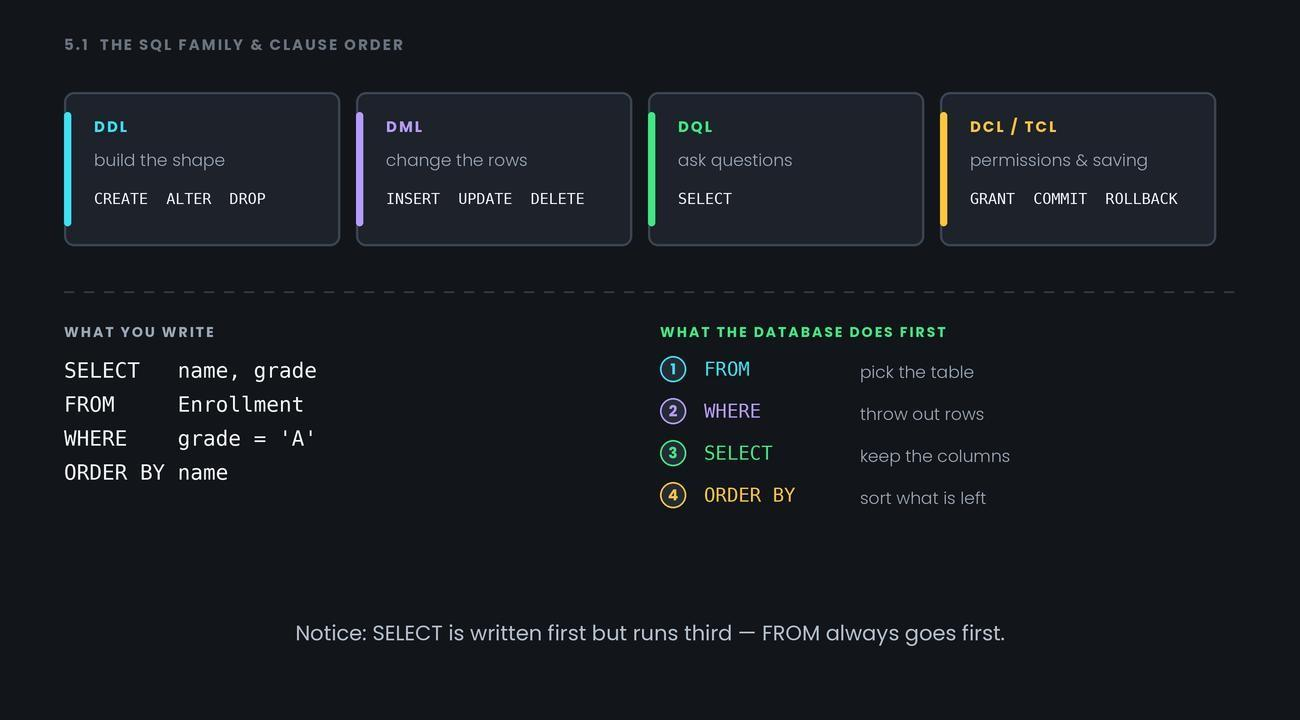
Notice: SELECT is written first but runs third — FROM always goes first.
Common confusion
DELETE vs TRUNCATE vs DROP. All three remove things, but they're not interchangeable:
- DELETE — removes rows, and you can add a WHERE to pick which. It's DML, so it can be rolled back.
- TRUNCATE — removes all rows fast, no WHERE allowed. It's DDL.
- DROP — removes the whole table, structure and all. Also DDL.
DELETE empties the box row by row. TRUNCATE tips the box out. DROP throws the box away.
Second one: NULL doesn't behave like a value. WHERE grade = NULL returns nothing at all — not even rows where the grade really is NULL. NULL means "unknown", and comparing anything to unknown gives unknown, not true. You must write WHERE grade IS NULL.
Interview angle
- "What's the difference between DELETE, TRUNCATE and DROP?" — DELETE removes chosen rows and can be rolled back; TRUNCATE removes all rows quickly; DROP removes the table itself. Mention that DELETE is DML while the other two are DDL.
- "In what order does SQL actually run a query?" — FROM, WHERE, GROUP BY, HAVING, SELECT, ORDER BY. Then give the payoff: that's why a SELECT alias can't be used in WHERE.
- "How do you find rows where a column has no value?" — IS NULL, never = NULL, because a comparison with unknown never returns true.
Quiz: skipped — reinforced above.
Recap
SQL describes what you want, not how to get it — FROM picks the table, WHERE filters rows, SELECT picks columns, ORDER BY sorts, and the run order is not the writing order.