DBMS · Module 6 — Transactions & Concurrency
Concurrency Problems
Overlapping transactions cause four named problems — dirty read (uncommitted data), lost update (one write erases another), non-repeatable read (a row changed), phantom read (a row appeared).
Sign in to track your score
One transaction at a time is easy. But a college portal has 900 students clicking at once on results day.
The database is now running many transactions at the same time, touching the same rows. Four specific things can go wrong. They have names, and interviewers ask for them by name.
Why & what
You could run transactions strictly one after another and be perfectly safe. You'd also be unbearably slow — one student's slow query would block 899 others.
So databases overlap transactions to stay fast. Overlapping is where the trouble starts.
A concurrency problem is a wrong result caused by two transactions overlapping in time. The four to know are dirty read, lost update, non-repeatable read, and phantom read.
How it works
Two transactions, T1 and T2, both touching Aisha's fees_due of 12,000.
- Dirty read — reading something that never really existed. T1 sets fees to 0. T2 reads it and sees 0. T1 then rolls back. T2 acted on a value that was never committed. It sent Aisha a "fees cleared" email for a payment that didn't happen.
- Lost update — one write silently erases another. T1 reads 12,000. T2 reads 12,000. T1 subtracts 1,000 and writes 11,000. T2 subtracts 2,000 from its copy and writes 10,000. Both payments happened, but only one is reflected. T1's 1,000 has vanished.
- Non-repeatable read — same row, two different answers. T1 reads fees = 12,000. T2 updates it to 9,000 and commits. T1 reads the same row again and now sees 9,000. Inside one transaction, a fact changed underneath it.
- Phantom read — same query, new rows appear. T1 counts enrollments in DBMS 101 and gets 3. T2 inserts a new enrollment and commits. T1 runs the identical count and gets 4. No row T1 read changed — a new one showed up.
- Spot the pattern. Non-repeatable read is about a row that changed. Phantom read is about rows that appeared. That single distinction is the most common exam question in this topic.
Pause here. T1 runs SELECT COUNT(*) twice and gets 5 then 6. Which problem is that?
Phantom read — the count changed because a new row appeared, not because an existing row was edited.
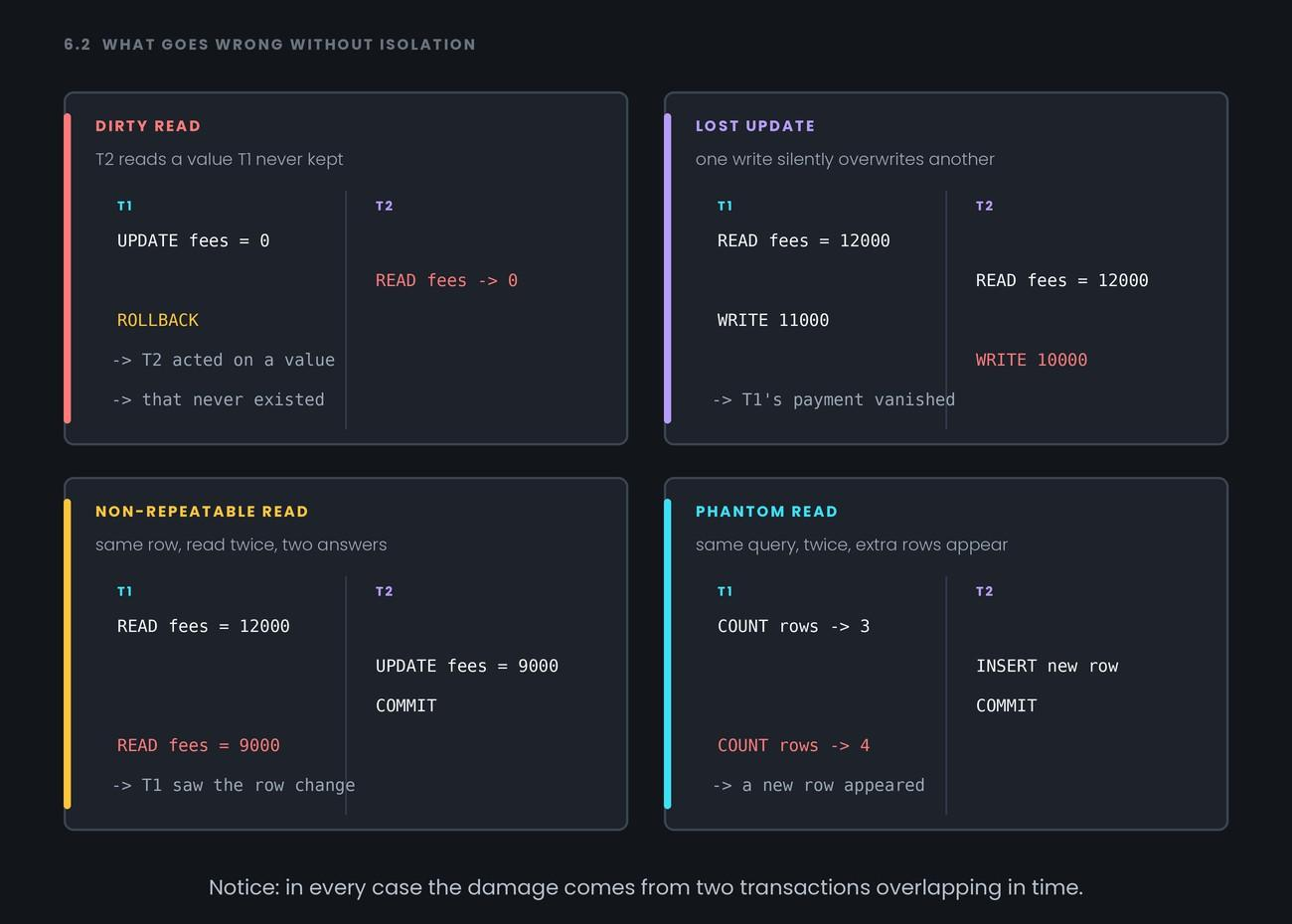
Notice: in every case the damage comes from two transactions overlapping in time.
Common confusion
Non-repeatable read vs phantom read is the classic trap. Use this test:
- Did a row you already read change? → non-repeatable read
- Did a new row turn up in your result? → phantom read
Row edited versus row added.
Second: people assume a dirty read means corrupt data. It doesn't. The value was perfectly valid at the moment it was read — it just belonged to a transaction that later gave up. "Dirty" means uncommitted, not broken.
Interview angle
- "Name the concurrency problems and give an example of each." — Dirty read, lost update, non-repeatable read, phantom read. A two-line T1/T2 sequence per problem beats any definition.
- "Difference between a non-repeatable read and a phantom read?" — One is an existing row changing; the other is a new row appearing. Say it in exactly that shape.
- "Why not just run everything one at a time?" — It's perfectly safe and unusably slow, because one slow transaction blocks everyone behind it.
Recap
Overlapping transactions cause four named problems — dirty read (uncommitted data), lost update (one write erases another), non-repeatable read (a row changed), phantom read (a row appeared).
- 1.
T2 reads a value that T1 later rolls back. This is
- 2.
Two transactions read the same balance, each subtract from it, and one deduction disappears. This is