DBMS · Module 7 — Storage & Indexing
How Data Is Actually Stored
Data lives on disk in fixed-size blocks, disk reads are around a million times slower than memory, so a database's real cost is blocks fetched — and with no index, that means every block in the table.
Your query works perfectly on 50 rows.
The college loads 5 years of real data — 2 million rows — and the same query now takes 40 seconds.
The SQL didn't change. So what did?
Why & what
Everything so far treated the database as an idea: tables, rows, keys. But rows live on a disk, and disks are staggeringly slow compared to memory.
That single fact explains almost every performance decision a database makes.
Data is stored on disk in fixed-size chunks called blocks (or pages). The database never reads one row — it reads the whole block that row sits in.
How it works
- Two kinds of memory. RAM is measured in nanoseconds and forgets everything on power loss. Disk is measured in milliseconds and remembers. A disk read is roughly a million times slower than a RAM read.
- So the database counts disk reads, not rows. When it decides how to run your query, "how many rows do I compare" barely matters. "How many blocks must I fetch" is everything.
- Rows are packed into blocks. A block is typically 4KB or 8KB. If a row is 100 bytes, roughly 80 rows fit in one block.
- You can't read half a block. Ask for one row and the disk hands you the whole block it lives in. That's not waste — it's a bet that you'll want its neighbours next.
- Without help, the database reads everything. WHERE roll_no = 103 with nothing to guide it means a full table scan: fetch block 1, check every row, fetch block 2, check every row, all the way to the end. 2 million rows is about 25,000 block reads.
Pause here. A table has 800,000 rows and 100 rows fit per block. Roughly how many block reads does a full table scan cost?
8,000. Rows divided by rows-per-block. That number — not the row count — is what determines how long you wait.
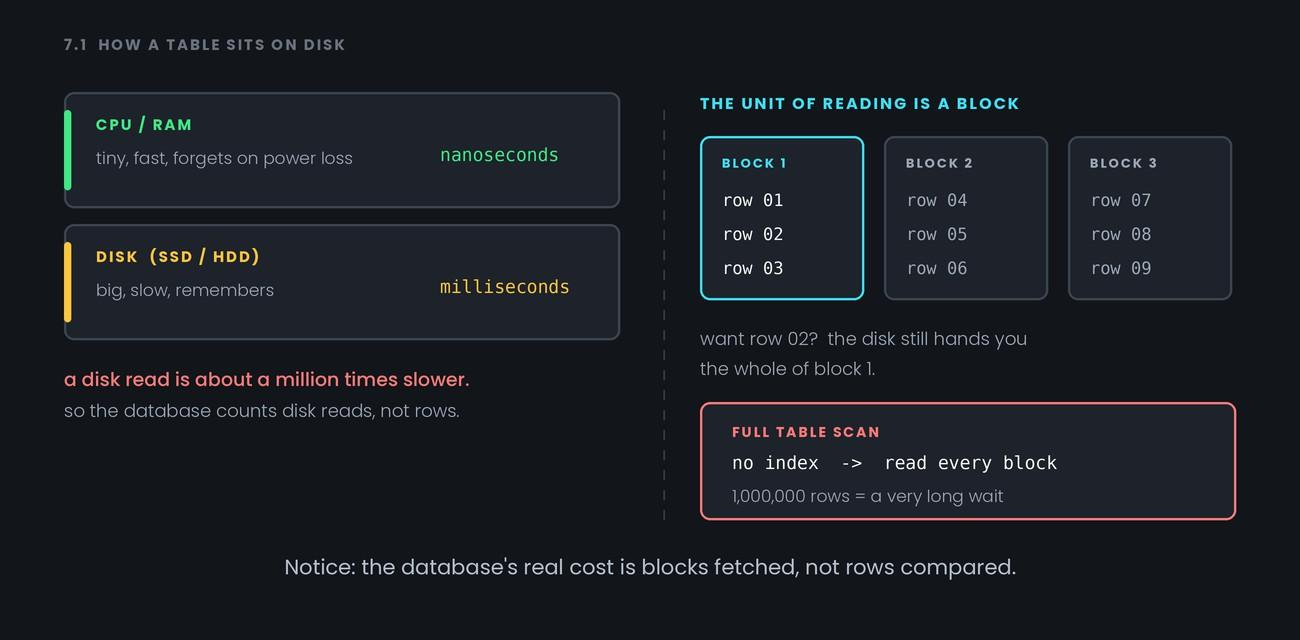
Notice: the database's real cost is blocks fetched, not rows compared.
Common confusion
People assume a faster CPU fixes slow queries. It usually doesn't. The CPU spends most of a slow query waiting for the disk. Adding cores to a query that's disk-bound changes almost nothing — which is why the fix is nearly always "read fewer blocks," not "compute faster."
Second: SSDs are much faster than spinning disks, and that helps a lot. But they're still far slower than RAM, so the block-counting logic is unchanged. SSDs make bad queries less painful, not fast.
Interview angle
- "Why does a query get slower as a table grows?" — More rows means more blocks, and without an index the database must fetch all of them. Say the cost scales with blocks read.
- "What is a full table scan and when is it acceptable?" — Reading every block of a table. It's fine on small tables, or when you genuinely need most of the rows anyway — an index wouldn't help there.
- "Why does the database read a whole block for one row?" — Disks transfer in fixed chunks, and neighbouring rows are often wanted next, so the block is the natural unit.
Quiz: skipped — reinforced above.
Recap
Data lives on disk in fixed-size blocks, disk reads are around a million times slower than memory, so a database's real cost is blocks fetched — and with no index, that means every block in the table.