DBMS · Module 5 — SQL
Aggregate Functions, GROUP BY & HAVING
Aggregates squeeze many rows into one value, GROUP BY makes the buckets they run inside, and HAVING filters those buckets — while WHERE filters rows before any of it happens.
Sign in to track your score
Nobody asks "show me all 4,000 enrollments."
They ask: how many students per course? what's the average grade? which courses are over-subscribed?
Those are questions about groups of rows, not rows.
Why & what
Everything so far worked one row at a time. WHERE looks at a row and keeps or drops it. But "how many students in DBMS 101" can't be answered by looking at one row — you have to look at a pile of them together.
An aggregate function squeezes many rows into one value: COUNT, SUM, AVG, MIN, MAX. GROUP BY splits rows into buckets so the aggregate runs once per bucket. HAVING then filters those buckets.
How it works
Three enrollment rows: DBMS101 A, DBMS101 B, OS101 A. Question: how many students per course?
- Aggregate with no grouping. SELECT COUNT(*) FROM Enrollment gives 3. One number for the whole table. Useful, but not per-course.
- Split into buckets — GROUP BY. GROUP BY course makes two buckets: a DBMS101 bucket holding two rows, and an OS101 bucket holding one.
- Run the aggregate per bucket. COUNT(*) now runs once inside each bucket: DBMS101 → 2, OS101 → 1. Each bucket collapses into a single output row.
SELECT course, COUNT(*) AS students
FROM Enrollment
GROUP BY course;
- Filter the buckets — HAVING. Want only courses with more than one student? HAVING COUNT(*) > 1 keeps DBMS101 and drops OS101. Note you couldn't have used WHERE here — the count didn't exist yet when WHERE ran.
- Use both together. WHERE grade = 'A' first drops rows, then grouping happens on what's left. So WHERE shrinks the input; HAVING shrinks the output.
Pause here. A course has 3 enrollments but only 1 with grade A. With WHERE grade='A' ...
GROUP BY course, what count comes back for that course?
- WHERE ran first and removed the other two rows, so only one row ever reached the bucket.
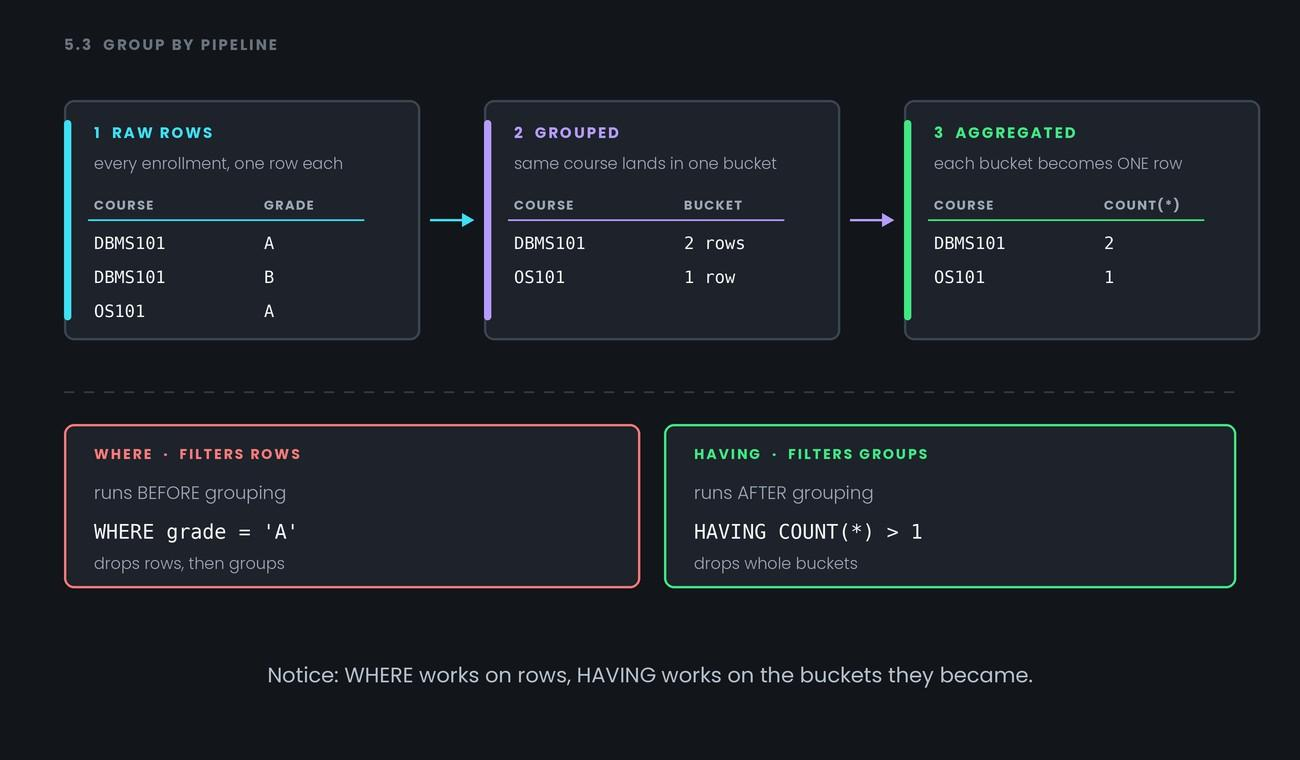
Notice: WHERE works on rows, HAVING works on the buckets they became.
Common confusion
WHERE vs HAVING is the most-asked question in this whole topic. One line settles it: WHERE runs before grouping, HAVING runs after. So WHERE can't see aggregate results, and HAVING can.
The other classic error: selecting a column that isn't grouped. This fails:
SELECT course, name, COUNT(*) FROM Enrollment GROUP BY course;
The DBMS101 bucket holds two different students, so which name should it print? There's no sensible answer, so the query is rejected. Rule: every column in SELECT must either be in GROUP BY, or be wrapped in an aggregate.
Last one: COUNT(*) vs COUNT(column). COUNT(*) counts rows. COUNT(grade) counts rows where grade is not NULL. On a table with ungraded enrollments, those two give different numbers — and interviewers know it.
Interview angle
- "Difference between WHERE and HAVING?" — WHERE filters rows before grouping, HAVING filters groups after. Add that HAVING can use COUNT/SUM and WHERE cannot.
- "Why can't you put a non-grouped column in SELECT?" — Because a bucket holds many rows and the database can't pick which value to show. Every SELECT column must be grouped or aggregated.
- "COUNT() versus COUNT(column)?"* — COUNT(*) counts all rows; COUNT(column) skips NULLs in that column.
- "Can you use both WHERE and HAVING in one query?" — Yes, and it's common: WHERE trims the input rows, HAVING trims the resulting groups.
Recap
Aggregates squeeze many rows into one value, GROUP BY makes the buckets they run inside, and HAVING filters those buckets — while WHERE filters rows before any of it happens.
- 1.
To keep only groups with more than 5 rows, you use
- 2.
A grade column has 10 rows, 3 of them NULL. COUNT(*) and COUNT(grade) return