Operating Systems · Module 3 — CPU Scheduling
Why scheduling exists: CPU and I/O bursts
No program computes forever. Every program alternates between two things:
Sign in to track your score
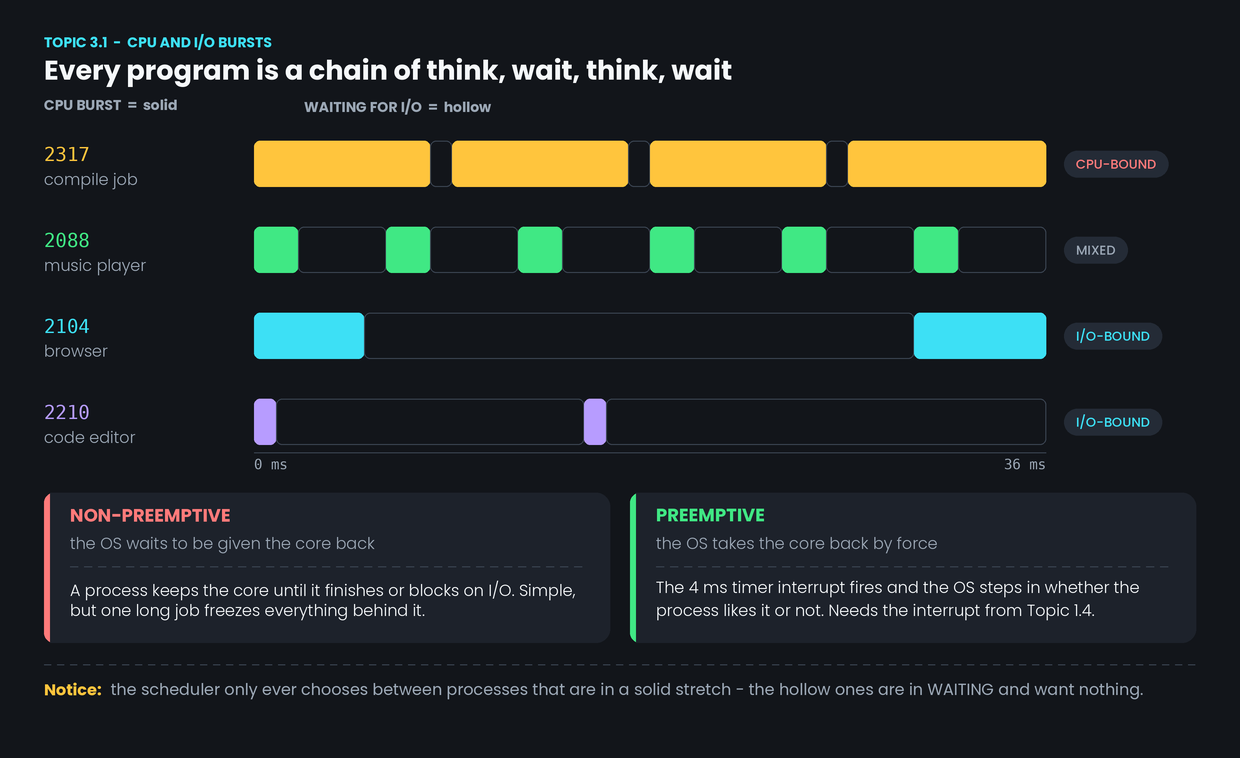
Watch the compile job (PID 2317) for one second. It computes, almost without stopping. It barely touches the disk.
Now watch the code editor (PID 2210). It computes for one millisecond when Aisha presses a key. Then it does nothing for two seconds until she presses the next one.
Both are "running programs". They could not be more different in what they want from a CPU.
A scheduler that treats them the same will make one of them feel broken.
Why & what
The burst pattern. No program computes forever. Every program alternates between two things:
- A CPU burst — a stretch where it needs a core and uses it.
- An I/O burst — a stretch where it is blocked, waiting for the disk, the network or a keypress. This is the Waiting state from Topic 2.2.
Think, wait, think, wait. Forever, until it exits.
Two kinds of program. What matters is the length of the CPU bursts.
- CPU-bound — long CPU bursts, short waits. The compile job. It wants as much continuous core time as it can get.
- I/O-bound — short CPU bursts, long waits. The browser and the editor. They want the core quickly, but only for a moment.
The music player sits in between: short, steady bursts every few milliseconds, forever.
Why a mix is lucky. While the browser waits 25 ms for a network reply, the core is free. The compile job can use it. Then the reply arrives and the browser needs the core for 5 ms. Neither one is slowed down much. A good scheduler exists to keep this overlap going.
Two families of scheduler.
- Non-preemptive — a process keeps the core until it finishes or blocks on I/O. The OS waits to be handed the core back.
- Preemptive — the OS takes the core back by force, using the timer interrupt from Topic 1.4.
Non-preemptive is simpler. It is also why a single long job can freeze everything behind it.
How it works
- A process starts a CPU burst. It is Running.
- It either finishes its burst or is cut off. It finishes by asking for I/O, or it is cut off by the 4 ms timer interrupt.
- The OS is now in control. Either the process gave the core back, or the interrupt took it.
- The scheduler looks at the ready queue and picks one process from it. Waiting processes are not candidates — they want an event, not a core.
- The dispatcher performs the context switch and the chosen process starts its burst. Cost: 5 µs, as measured in Topic 2.3.
Common confusion
"CPU-bound programs are the important ones." From the user's point of view the opposite is usually true. Aisha does not notice if the compile finishes at 14.0 or 14.2 seconds. She absolutely notices if her keypress takes 200 ms to appear. Schedulers generally favour I/O-bound processes for exactly this reason, and Topic 3.4 shows how.
"Preemptive means the process did something wrong." It did not. Being preempted just means the turn ended. The process is still perfectly healthy — it goes back to Ready, not to Terminated.
Interview angle
"What is the difference between CPU-bound and I/O-bound processes?" Answer with the burst pattern, then add the consequence: a good scheduler mixes them, so that one runs on the core while the other waits on a device.
"What is preemptive scheduling?" Say what makes it possible, not just what it is. Preemption needs a timer interrupt, because a program that never makes a system call will otherwise never give the core back. That single sentence links Modules 1 and 3 and interviewers notice it.
- 1.
The browser is blocked waiting for a network reply. Is the scheduler considering it?
- 2.
Which piece of hardware makes preemptive scheduling possible?