Operating Systems · Module 8 — File Systems, Storage & I/O
Files, directories, inodes and the open-file table
This is the idea the whole topic rests on.
Sign in to track your score
Aisha renames matrix.c to matrix_v2.c.
The file is 12 KB. The rename is instant — no copying, no waiting, even on the slow backup disk. Then she moves it to a different folder. Also instant.
Nothing about the file's contents moved. So what actually changed?
Why & what
The name is not part of the file. This is the idea the whole topic rests on.
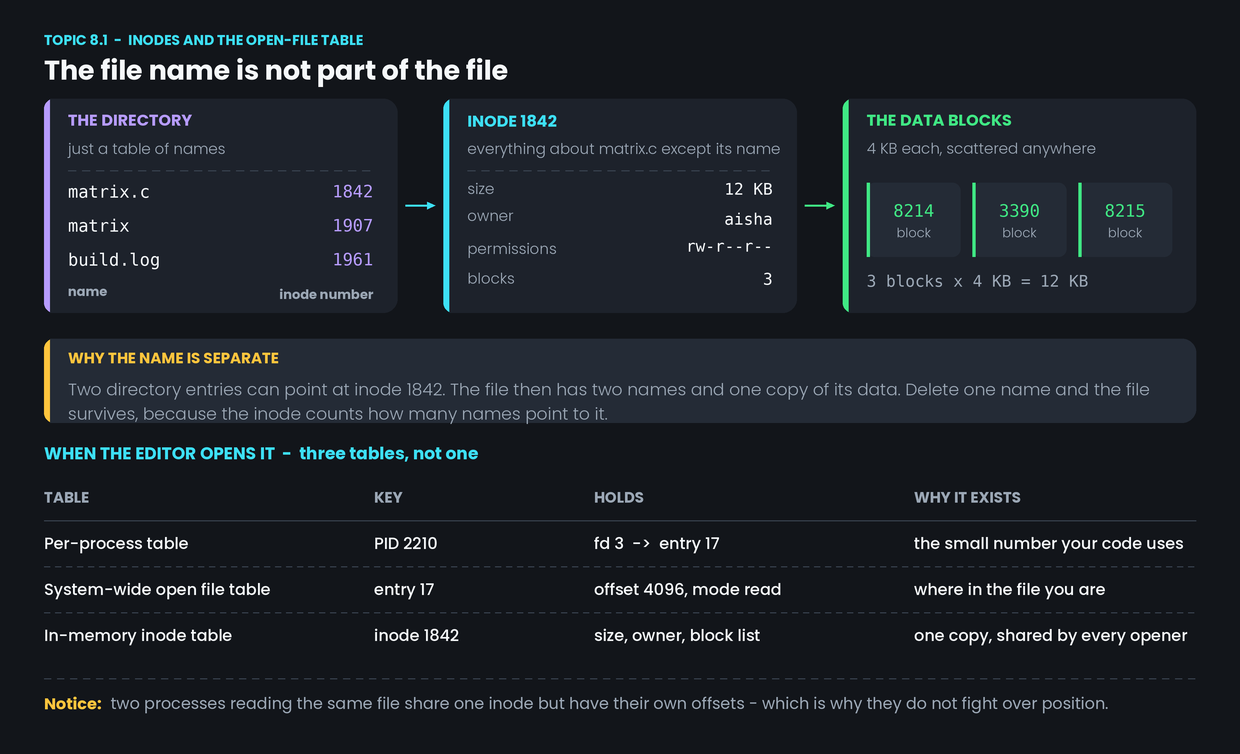
A directory is just a file containing a table. Each row is a name and a number. That number is an inode number.
The inode is a small record holding everything about the file except its name:
- size — 12 KB
- owner — aisha
- permissions — who may read and write it
- timestamps
- the list of which disk blocks hold the data
Renaming changes one string in a directory table. Moving rewrites one row in one table and adds it to another. Neither touches the inode or the data.
Hard links follow from this. Two directory entries can hold the same inode number. The file then has two names and one copy of its data. Neither is the "real" one. The inode counts how many names point at it, and the data is only freed when that count reaches zero — which is why deleting one name leaves the file intact.
Three tables when a file is open. Interviews ask why one table is not enough.
- Per-process open file table. The editor's file descriptor 3 points to an entry in the system-wide table. This is why every process gets its own small numbers starting at 0.
- System-wide open file table. Holds the current offset — how far into the file this opener has read — and the mode it was opened in.
- In-memory inode table. One entry per file, no matter how many processes have it open.
The split matters. If the editor and the compile job both open build.log, they share one inode but have separate offsets. Neither moves the other's position. If the offset lived in the inode, they would.
How it works
Opening matrix.c:
- Look up the name in the directory and get inode number 1842.
- Read inode 1842 from disk into the in-memory inode table, unless it is already there.
- Create an entry in the system-wide open file table with the offset at 0 and the mode set to read.
- Put a pointer to that entry in the editor's own table at the lowest free descriptor number, and return that number.
- Every later read uses the descriptor. The offset advances in the system-wide entry, and the block list in the inode says which blocks to fetch.
Common confusion
"The directory contains the files." It contains names and inode numbers. It does not contain file data, and a file's data is not "inside" a folder in any physical sense. That is why moving a file within one disk is instant while moving it to a different disk is slow — the second one really does copy the blocks.
"Deleting a file erases it." It removes a directory entry and decrements the inode's link count. If the count is still above zero, nothing is freed. And even at zero, the blocks are just marked free — the bytes stay on the disk until something else overwrites them.
"Each process has its own copy of the file when it opens it." Each process has its own offset. There is one inode and one set of blocks. Two processes writing at once will interleave their output, which is exactly the problem Module 4 solved for build.log.
Interview angle
"What is an inode?" The structure holding a file's metadata and block list — everything except its name. Then give the consequence, because it is the real answer to the question: the separation is what makes hard links and instant renames possible.
"Why are there three tables for open files?" Because different things need different scopes: descriptors are per process, the offset is per open, and the inode is per file. A worked example — two processes reading build.log with separate positions — makes the answer concrete.
- 1.
Aisha renames a 12 KB file. Why is it instant?
- 2.
The editor and the compile job both have build.log open. What do they share?