Operating Systems · Module 1 — Foundations: What an OS Actually Does
Interrupts: how the OS gets control back
The OS could check the keyboard constantly "anything yet? anything yet?" This is called polling. It works, but it burns CPU time doing nothing, forever, for every device.
Sign in to track your score
The compile job (PID 2317) is running flat out on a core. It has no reason to stop. It makes no system calls. It just computes.
Aisha presses a key in her editor.
The CPU is busy running the compiler. It is not watching the keyboard. Nobody asked it to check. So how does that keypress ever get noticed?
Why & what
The bad option: polling. The OS could check the keyboard constantly "anything yet? anything yet?" This is called polling. It works, but it burns CPU time doing nothing, forever, for every device.
The good option: interrupts. An interrupt is a signal from hardware that forces the CPU to stop what it is doing and run OS code instead.
- Polling: the CPU keeps asking. Wastes time when nothing happens.
- Interrupts: the device speaks up. Costs nothing while idle.
Where the CPU jumps. The kernel sets up a table of addresses at boot, one per device the interrupt vector table. Interrupt number 1 means keyboard, so the CPU jumps to entry 1. The code it lands in is the interrupt service routine, or ISR — a short piece of kernel code that deals with that one device.
The most important interrupt of all is the timer. The kernel programs a hardware timer to fire every few milliseconds. That firing is the only reason a program like the compiler, which never makes a system call, can ever be taken off the CPU. Without the timer interrupt, one infinite loop would freeze the whole laptop. Module 3 is built entirely on this.
How it works
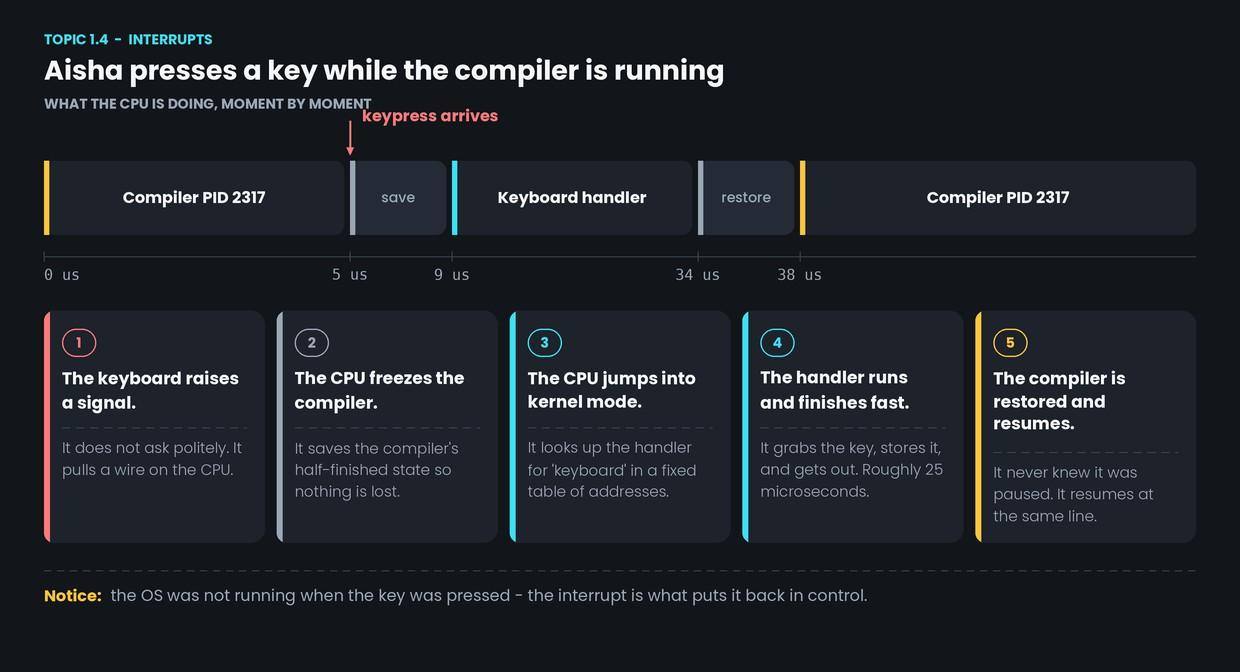
- The keyboard raises a signal. It pulls its interrupt line on the CPU.
- The CPU freezes the compiler. It saves the compiler's half-finished state so nothing is lost.
- The CPU switches to kernel mode and looks up the keyboard's entry in the interrupt vector table.
- The ISR runs and finishes fast. It grabs the key, stores it for the editor, and gets out. About 25 microseconds.
- The compiler is restored and resumes. It picks up on the exact same instruction. It never knew it was paused.
Common confusion
"Interrupt, trap and exception are all the same." They arrive at the same place the kernel — but they start differently.
- Interrupt — from hardware, and unrelated to whatever is running. The keypress.
- Trap deliberate, from the running program. A system call (Topic 1.3).
- Exception — an accident inside the running program. Divide by zero.
Interrupts are asynchronous: they can land between any two instructions. Traps and exceptions are synchronous: they are caused by the instruction being executed right now.
"Longer ISRs are more thorough." The opposite. While an ISR runs, other interrupts may be blocked. A slow ISR means dropped keypresses and stuttering audio. Good ISRs do the bare minimum and hand the rest off.
Interview angle
"How does the OS regain control from a program that never gives it up?" This is the question this topic exists for. The answer is one word the timer interrupt — plus the reason: a hardware timer fires every few milliseconds, which forces the CPU into the kernel whether the running program likes it or not.
You should also be able to name the two, and only two, ways the kernel ever starts running: a trap (the program asked) and an interrupt (hardware demanded). Everything the OS does begins with one of these. That single line ties Topics 1.1, 1.3 and 1.4 together, and it is worth memorising.
- 1.
The compile job runs an infinite loop and makes no system calls. What stops it from freezing the laptop?
- 2.
A program divides by zero. What is this called?