Operating Systems · Module 2 — Processes & Threads
Process states and the state-transition diagram
This is why the OS keeps them in separate queues. Handing a core to a waiting process would be wasted.
Sign in to track your score
The Nova-14 has 4 cores. Aisha has 4 apps open plus about 200 background programs.
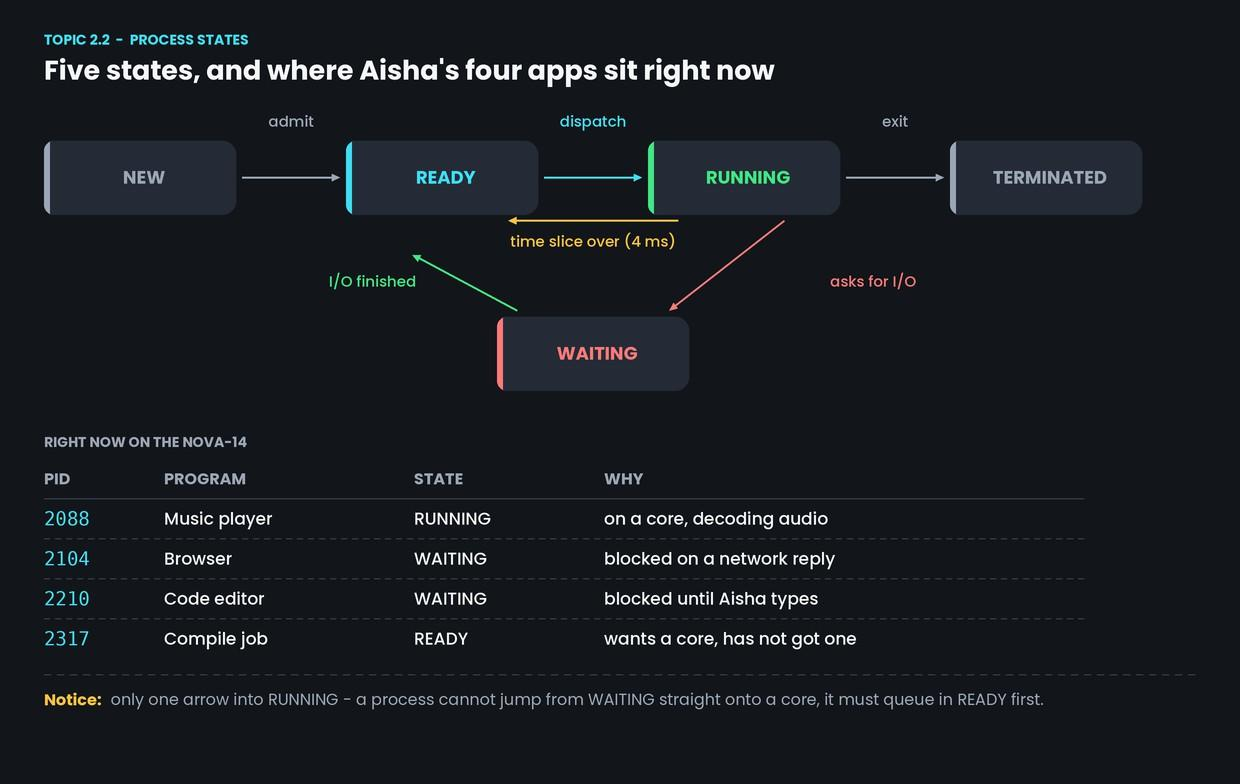
Right now the music player is genuinely on a core. The browser is doing nothing at all — it is waiting for a reply from a server. The editor is doing nothing either — it is waiting for Aisha to type. The compile job desperately wants a core and has not been given one.
Three different kinds of "not running". The OS needs a word for each.
Why & what
A process is always in exactly one state. There are five.
- New — being created. Its address space is being set up.
- Ready — it can run right now, but no core is free. It is queued.
- Running — it is actually on a core, executing.
- Waiting — it cannot run even if a core were free, because it is blocked on something. A disk read, a network reply, a keypress.
- Terminated — finished. Its memory is gone, but a small record survives until the parent collects it (Topic 2.4).
The distinction that earns marks is Ready vs Waiting.
- Ready: "give me a core and I will work."
- Waiting: "a core is useless to me — I need the disk to answer first."
This is why the OS keeps them in separate queues. Handing a core to a waiting process would be wasted.
How it works
The transitions between states:
- New to Ready (admit). Setup is finished, so the process joins the ready queue.
- Ready to Running (dispatch). The scheduler picks it and gives it a core. Module 3 is entirely about how this choice is made.
- Running to Ready (time slice over). The 4 ms timer interrupt fires. The OS takes the core back. The process did nothing wrong — it just ran out of turn.
- Running to Waiting (asks for I/O). It makes a system call that cannot answer immediately, such as reading from the SSD. It gives up the core voluntarily.
- Waiting to Ready (I/O finished). The data arrived. It is not put straight back on a core; it queues in Ready like everyone else.
The OS keeps one queue of Ready processes and a separate queue for each thing a process might be Waiting on. When the SSD finishes a read, the OS looks in the disk queue, finds who was waiting, and moves that one process to Ready.
You may also see diagrams with two extra states, suspended ready and suspended waiting. These mean the process has been pushed out of RAM entirely to free memory. Module 7 covers why that happens; for now, five states are enough.
Common confusion
"Waiting goes straight back to Running." No. There is exactly one arrow into Running, and it starts at Ready. When the browser's network reply arrives, the browser becomes Ready and queues. A core might be free a microsecond later, or a millisecond later. That is the scheduler's call, not the browser's.
"A frozen app is in Waiting." Usually yes, and that is why it is frozen — it is blocked on something that never answers. But an app stuck in an infinite loop is Running, perfectly healthy from the OS's point of view, and just as useless to Aisha.
Interview angle
"Explain the process state diagram." Draw it, then say the transitions out loud in order.
Interviewers are checking whether you can explain why each arrow exists, not whether you memorised five boxes.
"What is the difference between Ready and Waiting?" The sharpest answer is about what would fix it: a Ready process needs a CPU, and a Waiting process needs an event. Giving a CPU to a Waiting process changes nothing.
- 1.
The browser's network reply finally arrives. What state does it move to?
- 2.
The compile job's 4 ms time slice expires. Which transition happens?