OOP · Designing with Objects
Design Patterns
Shapes that keep working for problems that keep coming back.
Sign in to track your score
What you'll learn
- Say what a design pattern is — and what it is not.
- Tell the three pattern families apart by the question each answers.
- Recognise when Singleton, Factory, Strategy or Observer actually fits.
- Tell Strategy from Observer, and a simple factory from Factory Method.
How to use this module. Wherever you see THINK, PREDICT or SPOT THE PROBLEM, stop and answer before reading on. The answer always follows immediately — cover it with your hand if you need to. Every code sample here compiles and was run to confirm its output.
Spend a year writing software and you start noticing something odd: the same design questions keep coming back.
- Several parts of my app need to react when one thing changes. How do I wire that up without a mess?
- This object could be one of five types. Where does the decision about which one to build actually live?
- I need to swap out how a price is calculated, without rewriting the class that uses it.
- Half my app is reading settings. Should there really be six settings objects?
Different projects, different companies, different languages — and the same four questions.
Think — If thousands of developers keep hitting the same design problems, what would you expect to happen over time?
People wrote down the arrangements that kept working. Those write-ups are design patterns.
A design pattern is a reusable way of organising objects and responsibilities to solve a design problem that comes up often. It is a description of a shape your code can take.
Watch out — A pattern is not code you download and drop in. There is no
#include <singleton>.You recognise the problem, then write your own classes in that shape. Two programs using the same pattern can look completely different.
This module covers four of them, and — just as importantly — when not to reach for one.
8.1 What a pattern is + the three families
The idea, without the software
Think about how you'd organise a group dinner order. The first time is chaos. By the third time you've settled into something that works: collect everyone's choice first, then one person orders, then one person handles payment.
Nobody handed you that procedure. You arrived at it because the same problem kept appearing, and that arrangement kept working.
Nothing about it is a rule. If two people are ordering a pizza, the whole procedure is overkill.
Design patterns are exactly this, for code.
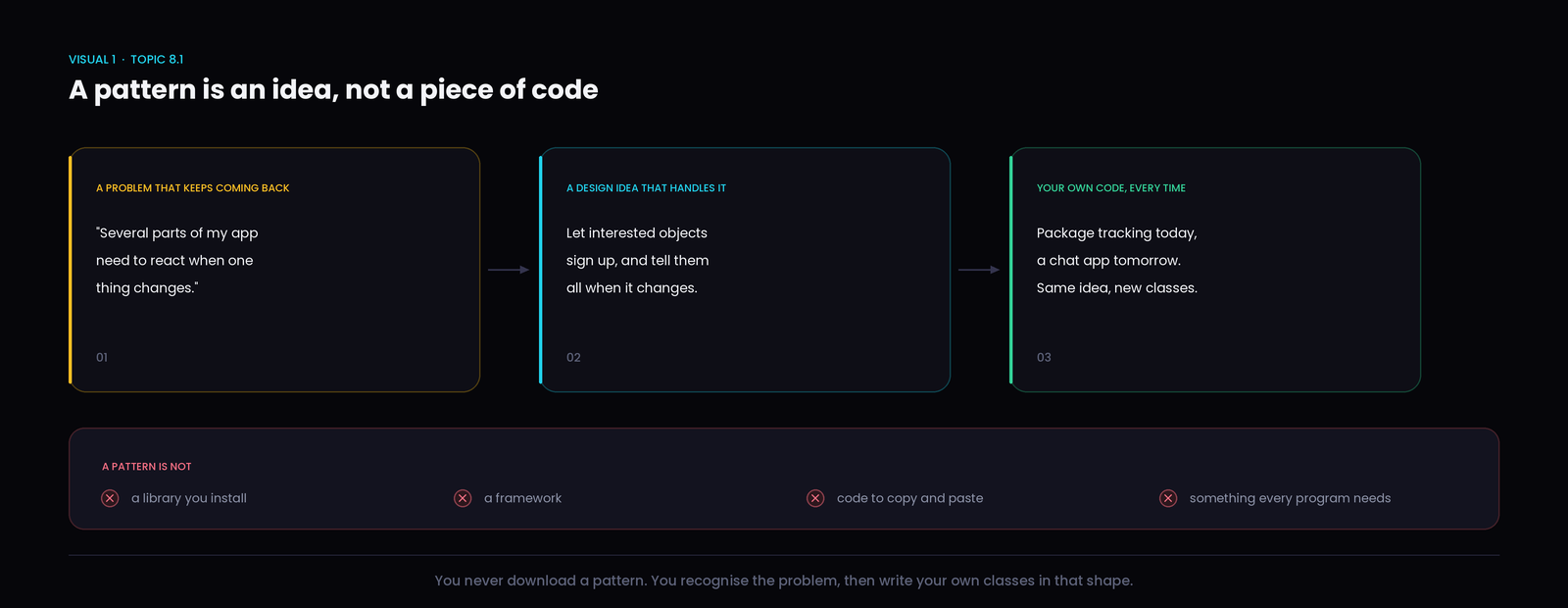
Being precise about what a pattern is not saves a lot of confusion later:
- Not a library — nothing to install.
- Not a framework — it doesn't run your program.
- Not copy-paste code — you write the classes yourself, named for your own domain.
- Not required — most code uses no named pattern at all, and that is fine.
Why they are worth knowing
Two reasons, and the second one is underrated.
They make design problems easier to solve. When you recognise "ah, several objects need to hear about a change", you don't have to invent an arrangement — a known one already fits.
They give you shared vocabulary. Saying "let's make the exporter a strategy" communicates a whole design in four words. Without the name, that's a five-minute explanation at a whiteboard.
Watch out — Patterns do not automatically improve a program. A pattern applied to a problem it doesn't fit makes things worse — more classes, more indirection, and the original problem still there.
The three families
Every pattern answers one of three questions, which is how they get grouped.
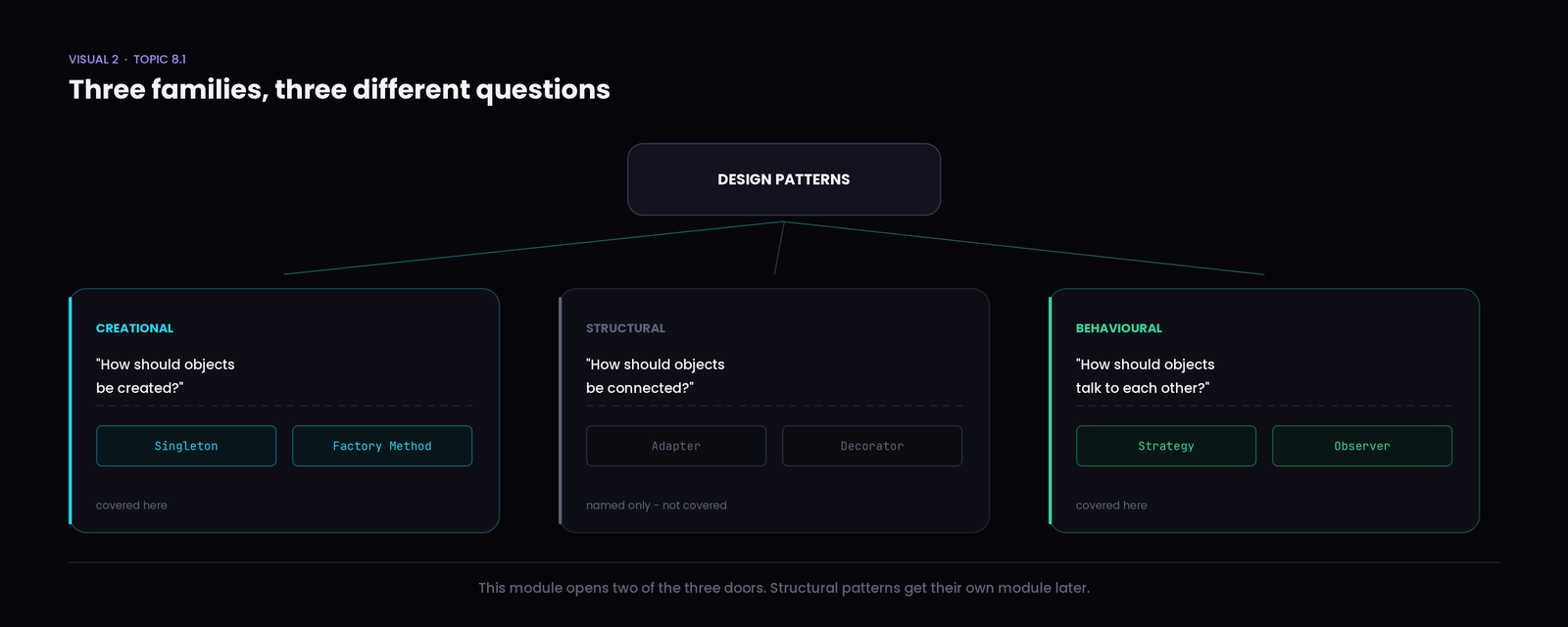
Creational — "how should objects be created?" Sometimes building an object is not as simple as calling a constructor. Maybe only one should ever exist, or maybe the type isn't known until the program runs. Singleton and Factory Method live here, and both are in this module.
Structural — "how should objects be connected?" These deal with fitting classes together — wrapping one thing to look like another, or adding behaviour without editing a class. Adapter and Decorator are two you'll meet. They get their own module; this one names them and moves on.
Behavioural — "how should objects talk to each other?" These are about responsibility and communication between objects at run time. Strategy and Observer are here, and both are in this module.
Quick check — An app needs to decide, while running, whether to build a
PdfReportor aCsvReport.Which family does that question belong to?
Answer — creational The whole question is about object creation. Nothing has been said yet about how the report behaves or what it connects to.
8.2 Singleton
The problem
An app keeps settings: theme, language, whether notifications are on.
The home screen creates a settings object to read the theme. The profile screen creates its own. The settings screen creates a third, and that is the one the user actually edits.
The user switches to light mode. The settings screen's object knows. The other two do not.
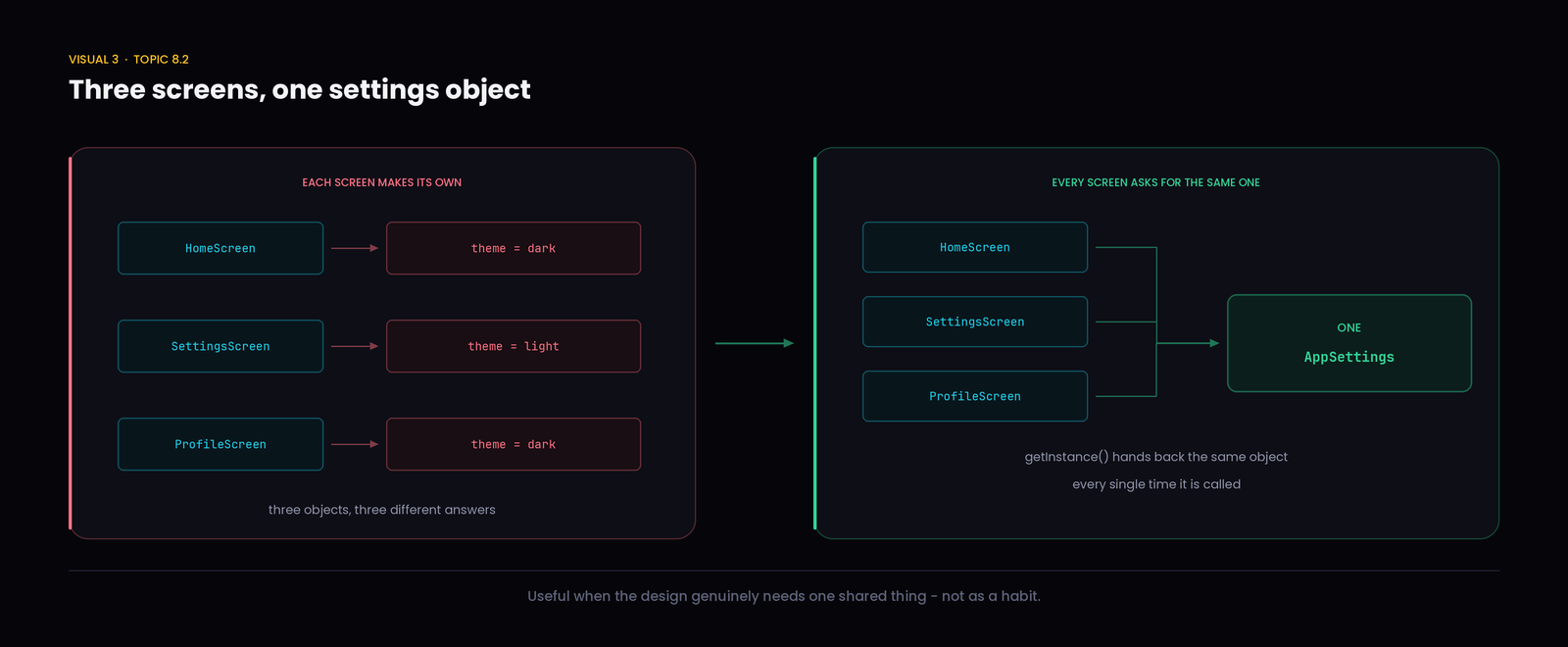
Nothing crashed. There is simply more than one answer to "what is the current theme", and which one you get depends on which screen you ask.
Think — The bug here is not in any single class. Every one of them is correct on its own.
So what would you change?
The idea
There should be one settings object, and everyone should get that one.
That is the whole idea, and it has a name: Singleton — a design where the class itself makes sure only one shared instance exists, and hands that same one to anybody who asks.
Three parts to it:
- The class controls how instances get made.
- Outside code cannot freely create more.
- Everyone reaches the shared one the same way.
In C++
class AppSettings {
private:
    AppSettings() {}                       // only the class can build one

    std::string theme = "dark";

public:
    static AppSettings& getInstance() {
        static AppSettings instance;       // built once, on first call
        return instance;
    }

    std::string getTheme() const { return theme; }
    void setTheme(std::string t) { theme = t; }
};
Two pieces are doing the work.
The private constructor means outside code cannot write AppSettings s;. Try it and the compiler stops you:
error: 'AppSettings::AppSettings()' is private within this context
The static local variable inside getInstance() is created the first time that function runs, and survives afterwards. Every later call returns the same one.
AppSettings& a = AppSettings::getInstance();
AppSettings& b = AppSettings::getInstance();

a.setTheme("light");

std::cout << b.getTheme() << "\n";
std::cout << (&a == &b ? "same object" : "different objects") << "\n";
light
same object
What happened: a was changed and b saw it, because a and b are two names for one object. The &a == &b check compares their addresses in memory, and they match.
Quick check — Three different screens each call
getInstance().How many
AppSettingsobjects exist?
Answer — one It gets built when the first screen asks, and the other two get that same object back. The number of calls does not affect the number of objects.
The honest trade-off
Singleton has a reputation problem, and it is partly deserved.
It is a reasonable fit when the design genuinely needs one shared thing — app settings, a single connection pool, a print queue that must serialise jobs.
The trouble starts when it becomes a habit:
- Testing gets harder. Any class calling
AppSettings::getInstance()reaches out and grabs the real settings. You cannot hand it fake settings for a test — the dependency is buried inside the method rather than visible in the constructor. - Connections become invisible. Ten classes might depend on the settings and nothing in their interfaces says so.
- "One instance" is a decision, not a default. Ask whether one is genuinely required, or whether you just didn't want to pass the object around.
Remember — Module 7 showed a class taking a
Payment&through its constructor. That is often the better alternative to a Singleton: the dependency is visible, and a test can pass in a fake.
8.3 Factory Method
The problem
A reporting tool exports to PDF, CSV and Excel. Somewhere, code has to decide which exporter to build.
if (format == "pdf")        e = new PdfExporter();
else if (format == "csv")   e = new CsvExporter();
else if (format == "excel") e = new ExcelExporter();
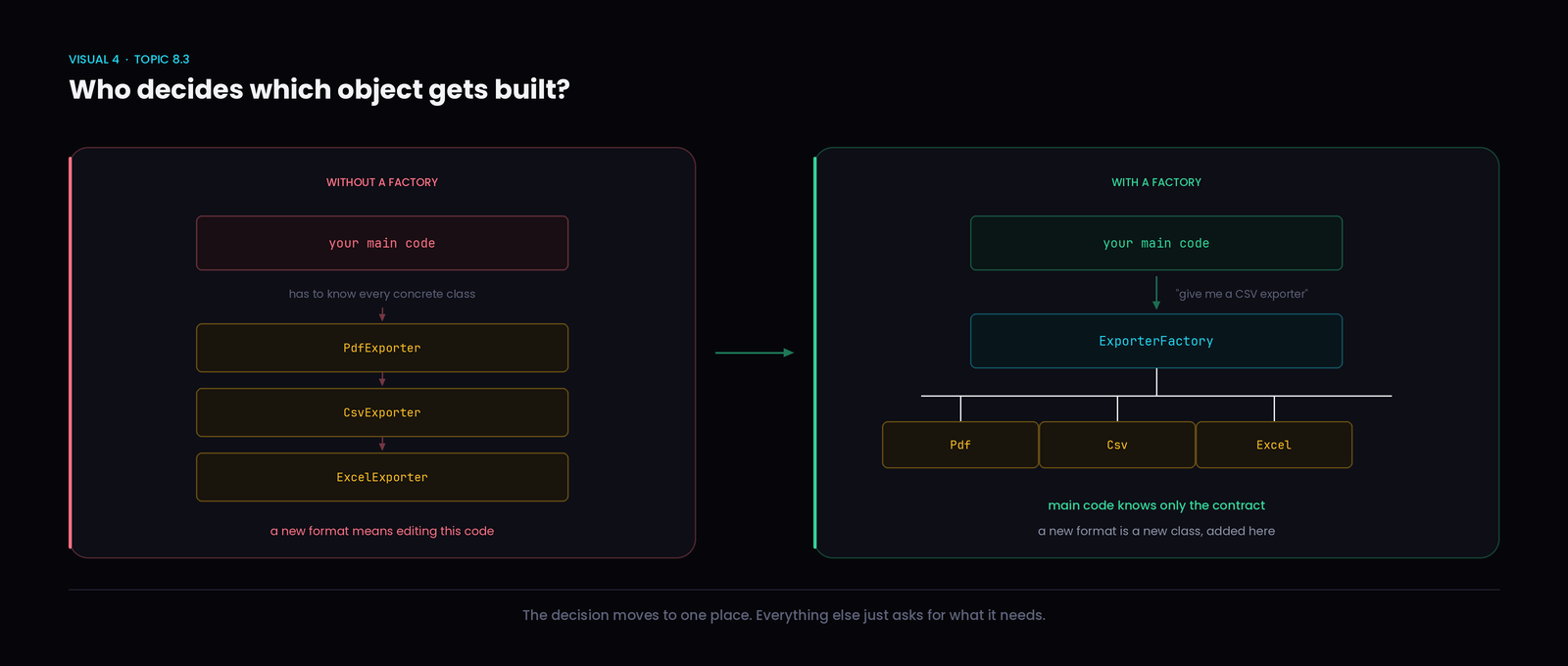
That block works. The problem is where it ends up: the screen that exports reports has it, the scheduled job has a copy, the email attachment builder has another.
Now marketing asks for JSON export.
Think — You add
JsonExporter. How many files do you now have to hunt down and edit?
Every place that block was copied. Miss one and that feature silently lacks JSON.
The deeper issue: code whose job is sending emails has been forced to know the names of every concrete exporter class in the system.
Step one: put the decision in one place
class Exporter {
public:
    virtual void write(std::string data) = 0;
    virtual ~Exporter() = default;
};

class PdfExporter : public Exporter {
public:
    void write(std::string data) override { std::cout << "PDF: " << data << "\n"; }
};

class CsvExporter : public Exporter {
public:
    void write(std::string data) override { std::cout << "CSV: " << data << "\n"; }
};
BEGINNER NOTE The = 0 is not assigning zero to anything. It marks a pure virtual function — the base class saying "this must exist, and every child has to supply it." A class with one cannot be created on its own.
The = default below it is unrelated: it asks the compiler for its standard version of that destructor.
Now one function owns the decision:
Exporter* createExporter(std::string format) {
    if (format == "pdf")   return new PdfExporter();
    if (format == "csv")   return new CsvExporter();
    if (format == "excel") return new ExcelExporter();
    return nullptr;
}
Exporter* e = createExporter("csv");
if (e) {
    e->write("March sales");
    delete e;
}
CSV: March sales
Why it is better: JSON export now means editing one function. Everything else asks for an Exporter and never learns the concrete names.
BEGINNER NOTE new builds an object that outlives the function, and delete frees it when you're done. Real projects usually use smart pointers to handle that automatically — a later topic. For now, notice that whoever receives the object is responsible for deleting it.
Step two: what "Factory Method" actually means
Here is where terminology gets muddled, so let's be precise.
What you just wrote is usually called a simple factory. It is useful, it is common, and it is not the Factory Method pattern. There's still one function containing a chain of conditionals; adding a format means reopening it.
Factory Method is a specific arrangement: a class that knows the overall job declares a method for creating the object it needs, and leaves subclasses to decide which one.
class ExportJob {
public:
    virtual Exporter* createExporter() = 0;      // the factory method

    void run(std::string data) {                 // the same steps for every job
        std::cout << "Preparing report...\n";
        Exporter* e = createExporter();
        e->write(data);
        delete e;
        std::cout << "Done.\n";
    }

    virtual ~ExportJob() = default;
};

class PdfExportJob : public ExportJob {
public:
    Exporter* createExporter() override { return new PdfExporter(); }
};

class CsvExportJob : public ExportJob {
public:
    Exporter* createExporter() override { return new CsvExporter(); }
};
PdfExportJob pdf;
CsvExportJob csv;
pdf.run("March sales");
csv.run("March sales");
Preparing report...
PDF: March sales
Done.
Preparing report...
CSV: March sales
Done.
What is happening: run() is written once and describes the whole export job — prepare, write, finish. It calls createExporter() without knowing what comes back. Each subclass answers that one question.
Why it matters: adding a JSON job means one new class. No conditional anywhere gets reopened.
| Simple Factory | Factory Method | |
|---|---|---|
| What it is | a helper that returns different types | a pattern where subclasses choose the type |
| The decision lives in | one function, usually a conditional | the overriding subclass |
| Adding a type | edit that function | add a new subclass |
| Is it a GoF pattern? | no | yes |
Both are worth knowing, and the simple factory is the right call more often than people admit. Use it when you have one decision point. Reach for Factory Method when the surrounding steps are identical and only the created object differs.
Quick check — Your team adds
JsonExporter. Which part of the system should mainly deal with creating it?
Answer — the factory, or a new job subclass Not the reporting screen, not the email builder, not the scheduler. Those ask for an Exporter and use it. Where creation happens is exactly what this pattern is pinning down.
8.4 Strategy & Observer
Two behavioural patterns. They get confused constantly, so each gets built up separately and then compared directly.
Part A — Strategy
A delivery app charges differently depending on the service. Standard is one rate per kilometre, express is higher, night delivery higher still.
The first version:
if (type == "standard")     fee = distance * 5;
else if (type == "express") fee = distance * 8;
else if (type == "night")   fee = distance * 12;
Then weekend pricing arrives. Then a premium tier. Then local delivery, which has a flat rate below 3 km.
Think — The
DeliveryServiceclass was supposed to handle deliveries. What is it slowly turning into?
A pricing rulebook. Every rate change edits a class whose real job is something else, and the formulas are tangled together where they can break each other.
The idea
Each way of calculating the fee is a separate object, and the service holds whichever one it was given.
That is Strategy — putting interchangeable ways of doing one job into separate objects that can be swapped.
class DeliveryFeeStrategy {
public:
    virtual double calculate(double distance) = 0;
    virtual ~DeliveryFeeStrategy() = default;
};

class StandardDelivery : public DeliveryFeeStrategy {
public:
    double calculate(double distance) override { return distance * 5; }
};

class ExpressDelivery : public DeliveryFeeStrategy {
public:
    double calculate(double distance) override { return distance * 8; }
};

class NightDelivery : public DeliveryFeeStrategy {
public:
    double calculate(double distance) override { return distance * 12; }
};
The service holds one and asks it:
class DeliveryService {
private:
    DeliveryFeeStrategy& strategy;

public:
    DeliveryService(DeliveryFeeStrategy& s) : strategy(s) {}

    double getFee(double distance) {
        return strategy.calculate(distance);
    }
};
BEGINNER NOTE strategy is a reference, so C++ requires it to be attached in the constructor's initializer list — the : strategy(s) before the { }. A reference must point at something from the moment it is created; you cannot leave it empty and assign it later inside the braces.
StandardDelivery standard;
ExpressDelivery  express;
NightDelivery    night;

DeliveryService a(standard);
DeliveryService b(express);
DeliveryService c(night);

std::cout << a.getFee(10) << " " << b.getFee(10) << " " << c.getFee(10) << "\n";
50 80 120
What is happening: three services, three different prices, and DeliveryService contains no formula at all.
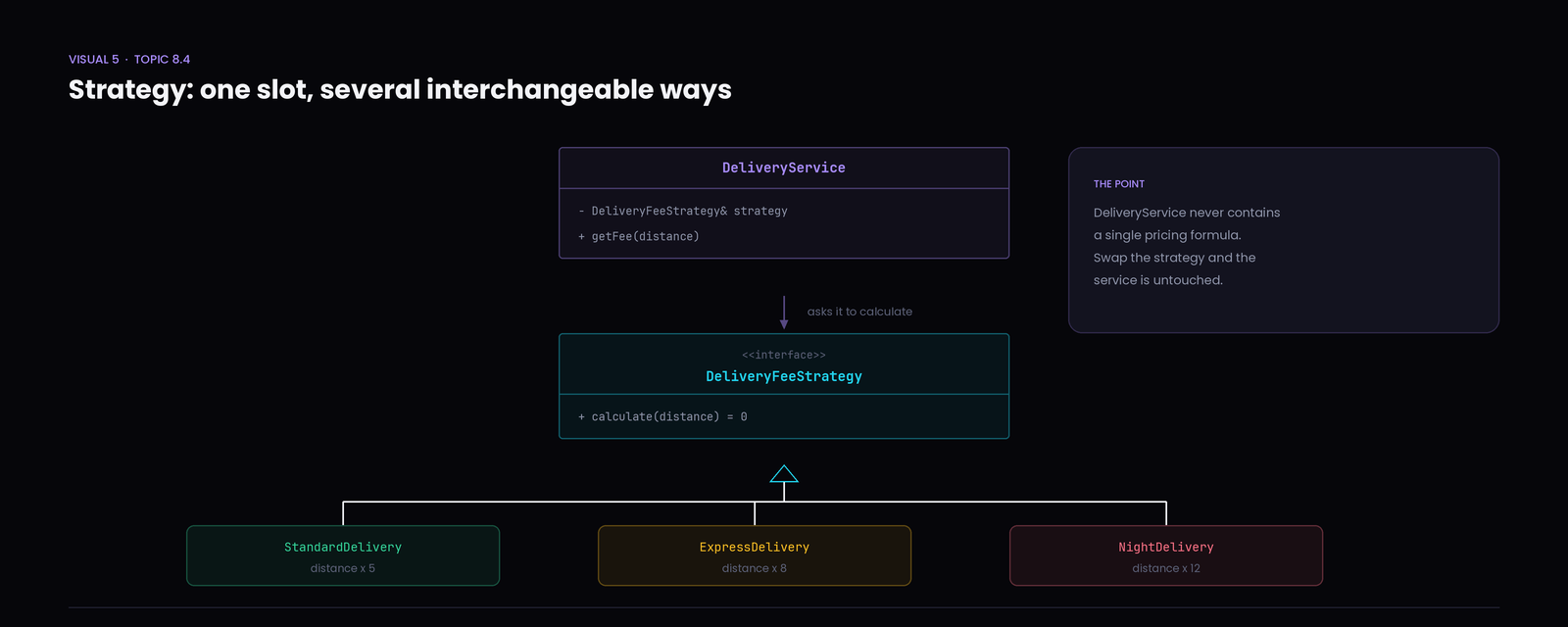
Why it matters: weekend pricing is a new class. DeliveryService is never reopened — which is the Open/Closed Principle from Module 7, with a name attached to the shape.
Quick check — The express rate changes from 8 to 9 per kilometre.
Does
DeliveryServiceneed to know?
Answer — no ExpressDelivery changes. DeliveryService never knew the number in the first place; it only knows that something can answer calculate().
Part B — Observer
A package moves through statuses: packed, shipped, out for delivery, delivered.
When it changes, several things should happen. The customer's app updates. An SMS goes out. The delivery dashboard refreshes a row. Later, someone adds an email receipt.
The straightforward version has PackageTracker call each one:
void setStatus(std::string s) {
    status = s;
    customerApp.refresh(s);
    smsNotifier.send(s);
    dashboard.update(s);
}
Think — Next quarter the company adds a WhatsApp notifier and a partner API. What happens to this function — and how often will it keep happening?
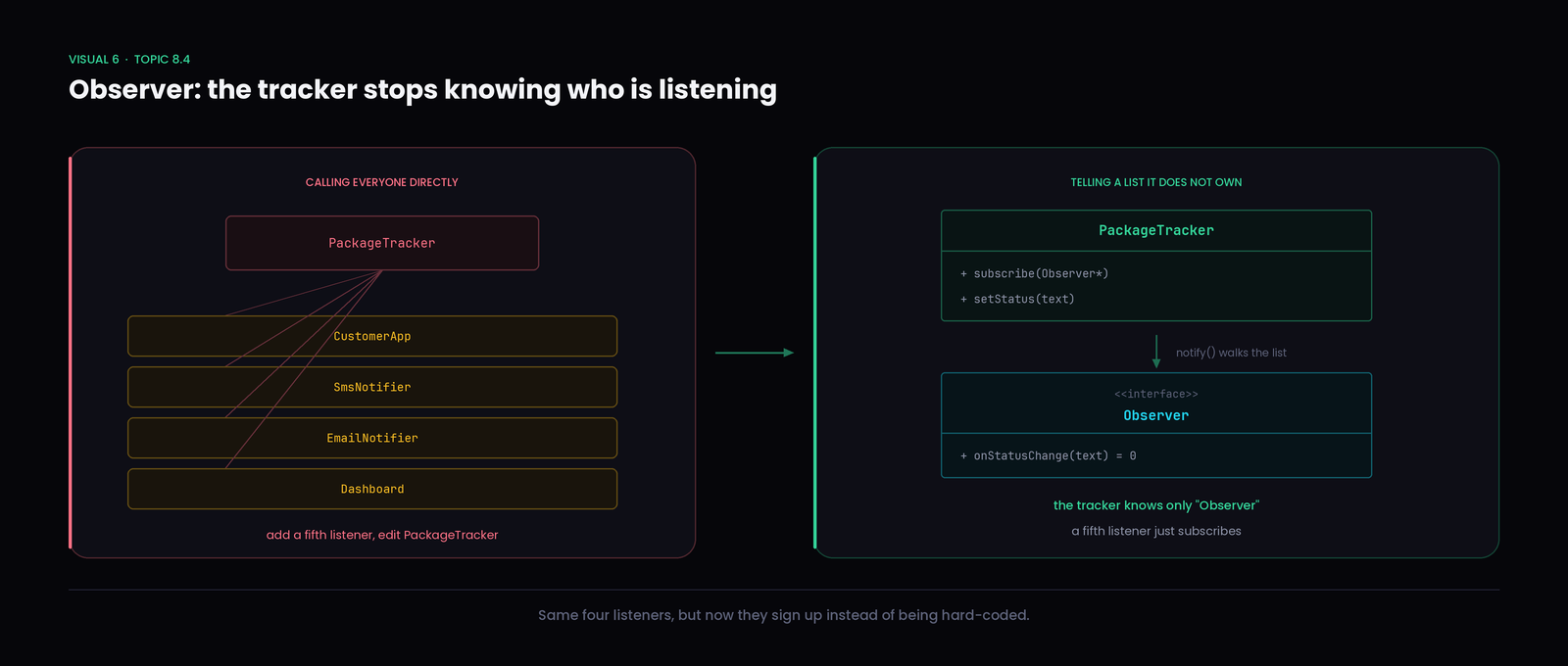
It grows every time, and PackageTracker ends up holding a reference to every system in the company. A class about packages now depends on SMS gateways and dashboards.
The idea
Flip who knows whom. Interested objects sign up with the tracker, and when the status changes the tracker tells everyone on its list — without knowing what any of them actually do.
That is Observer. The object being watched is the subject; the ones signing up are observers.
class Observer {
public:
    virtual void onStatusChange(std::string status) = 0;
    virtual ~Observer() = default;
};

class CustomerApp : public Observer {
public:
    void onStatusChange(std::string s) override {
        std::cout << "  App banner: " << s << "\n";
    }
};

class SmsNotifier : public Observer {
public:
    void onStatusChange(std::string s) override {
        std::cout << "  SMS sent: " << s << "\n";
    }
};
The subject keeps a list and walks it:
class PackageTracker {
public:
    void subscribe(Observer* o) { watchers.push_back(o); }

    void setStatus(std::string newStatus) {
        status = newStatus;
        std::cout << "Status -> " << status << "\n";
        for (Observer* o : watchers) o->onStatusChange(status);
    }

private:
    std::string            status;
    std::vector<Observer*> watchers;
};
CustomerApp       app;
SmsNotifier       sms;
DeliveryDashboard dash;

PackageTracker tracker;
tracker.subscribe(&app);
tracker.subscribe(&sms);
tracker.subscribe(&dash);

tracker.setStatus("Out for delivery");
Status -> Out for delivery
  App banner: Out for delivery
  SMS sent: Out for delivery
  Dashboard row updated: Out for delivery
What is happening: PackageTracker never names CustomerApp, SmsNotifier or DeliveryDashboard. It knows only that it holds a list of things answering to Observer.
Why it matters: the WhatsApp notifier is a new class plus one subscribe() call. PackageTracker is untouched.
Quick check — An email receipt system is added. What has to change inside
PackageTracker?
Answer — nothing Write EmailNotifier as an Observer and subscribe it. That is the whole change. Whoever sets up the app decides who listens; the tracker just broadcasts.
Strategy vs Observer
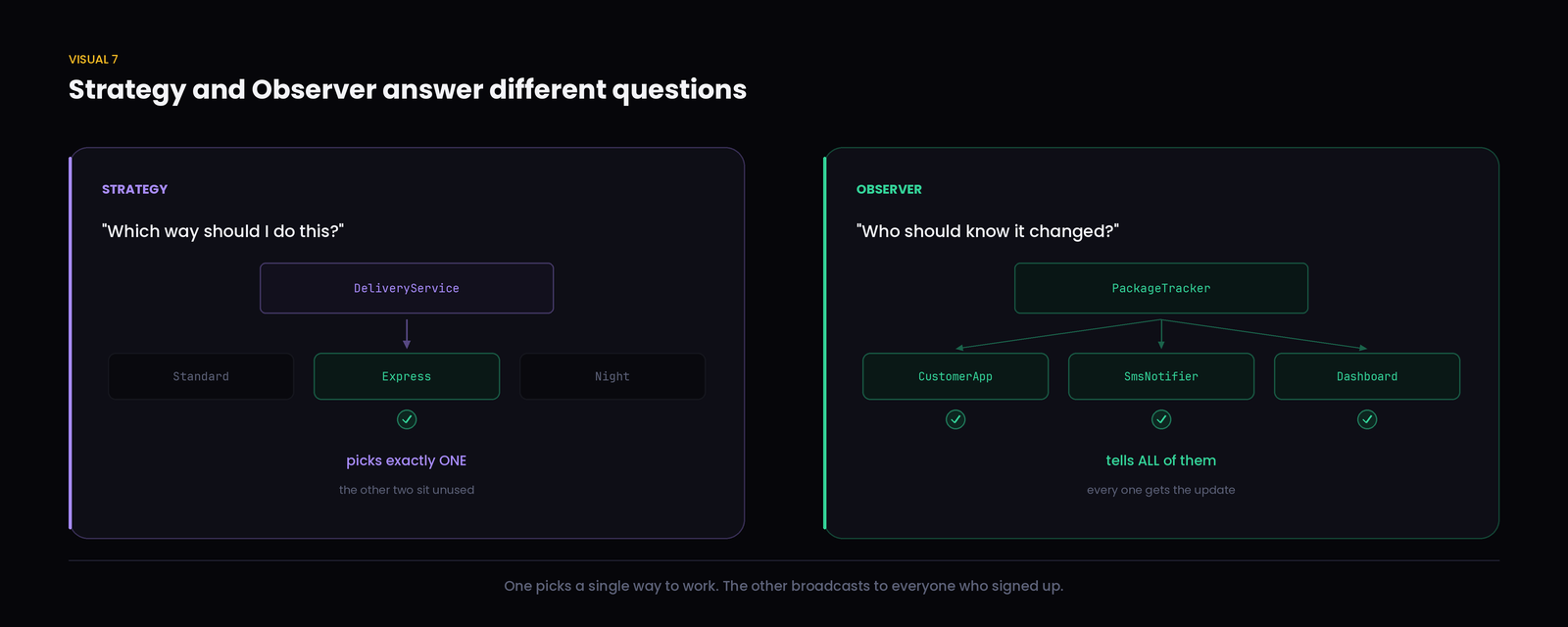
Both hold something behind an interface, which is why they blur together. The questions they answer are completely different.
| Strategy | Observer | |
|---|---|---|
| The question | "Which way should I do this?" | "Who should know it changed?" |
| How many are used | exactly one at a time | all of them, every time |
| Direction | the context asks the strategy for a result | the subject tells the observers, expecting nothing back |
| Swapping | replace one with another | add or remove from a list |
| Here | which fee formula to apply | who hears the status changed |
One sentence, if you only keep one thing: Strategy picks one; Observer tells many.
Common Misconceptions
❌ Design patterns are ready-made code libraries. Better understanding: nothing gets installed. A pattern is a described shape; you write your own classes, named for your own problem. Two programs using Observer may share no code at all.
❌ Every project should use design patterns. Better understanding: most good code uses no named pattern. Patterns solve specific recurring problems — reach for one when you actually have that problem, not to show the codebase is serious.
❌ Singleton means every class should have one instance. Better understanding: it applies to the rare class where more than one would genuinely cause trouble. Most classes should have many instances — that is the normal case, not a design flaw.
❌ A factory is just a way to hide new . Better understanding: hiding new is a side effect. The real point is that code using an object stops needing to know which concrete class it is, so adding a type doesn't ripple through the app.
❌ "Factory" and "Factory Method" are the same thing. Better understanding: a simple factory is a helper function or class containing the decision. Factory Method is a pattern where a subclass makes the decision by overriding a creation method. Both are useful; only the second is the GoF pattern.
❌ Strategy and Observer solve the same problem. Better understanding: Strategy chooses one of several ways to do a job. Observer notifies many objects that something happened. One is about how, the other about who finds out.
❌ Observer means one class controls all the others. Better understanding: the opposite. The subject does not control observers and does not know what they do — it announces a change and they decide how to react. That is why the subject stops depending on them.
❌ Using a pattern automatically makes code better. Better understanding: a pattern applied to a problem it doesn't fit adds classes and indirection while leaving the original problem in place. The design got longer, not clearer.
Remember — Patterns are tools, not trophies.
Do not add a pattern because you just learned it. A small program does not need Singleton, Factory, Strategy or Observer. Sometimes three lines and an
ifare the better design, and recognising that is a skill too.
Interview Corner
Q1. What is a design pattern, in your own words? A reusable way of arranging objects and responsibilities that solves a design problem that keeps coming up. It is a description of a shape, not code you install — you write your own classes to fit it.
Q2. Why are patterns useful if you have to write the code yourself anyway? Two reasons. You don't have to reinvent an arrangement for a problem people have already solved well. And they give teams shared vocabulary — "make the exporter a strategy" replaces a long whiteboard explanation.
Q3. What are the three families, and what does each answer? Creational asks how objects should be created (Singleton, Factory Method). Structural asks how classes and objects should be connected (Adapter, Decorator). Behavioural asks how objects should communicate and share responsibility (Strategy, Observer).
Q4. What does this print, and why?
GameSettings& a = GameSettings::getInstance();
GameSettings& b = GameSettings::getInstance();
a.volume = 80;
std::cout << b.volume << " " << (&a == &b);
It prints 80 1. Both references name the same object, so a change through a is visible through b, and comparing their addresses gives true. That is Singleton working: repeated calls to getInstance() do not produce new objects.
Q5. A team makes their DatabaseConnection a Singleton so any class can reach it. Six months later nobody can unit-test the order module. What went wrong? The Singleton was used to avoid passing an object around. Any class calling getInstance() reaches out and grabs the real thing, so it cannot be given a fake in a test, and its dependencies don't appear in its interface. If the need is "everyone uses this object" rather than "only one may exist", passing it in through the constructor is usually better.
Q6. What problem does a factory solve here?
if (format == "pdf")        e = new PdfExporter();
else if (format == "csv")   e = new CsvExporter();
else if (format == "excel") e = new ExcelExporter();
If this block sits in several places, every new format means finding and editing all of them, and unrelated code must know every concrete exporter name. A factory puts the decision in one place; everything else asks for an Exporter and never learns the concrete types.
Q7. Which pattern is this, and how do you know?
class Report {
    SortStrategy& s;
public:
    Report(SortStrategy& st) : s(st) {}
    void build() { s.sort(); }
};
Strategy. Report holds one interchangeable object behind an interface and delegates a job to it, using exactly one at a time. If it held a list and told all of them something had happened, that would be Observer.
Q8. A stock app shows live prices. Several widgets must update when a price changes, and users can switch between simple and percentage-change display. Which patterns fit? Observer for the price updates — one price changing, many widgets needing to know, and the price feed shouldn't know what a widget is. Strategy for the display mode — one formatting approach chosen at a time, swappable without editing the widget. A factory only earns its place if widget creation itself gets complicated; otherwise adding it is over-engineering.
Module Recap
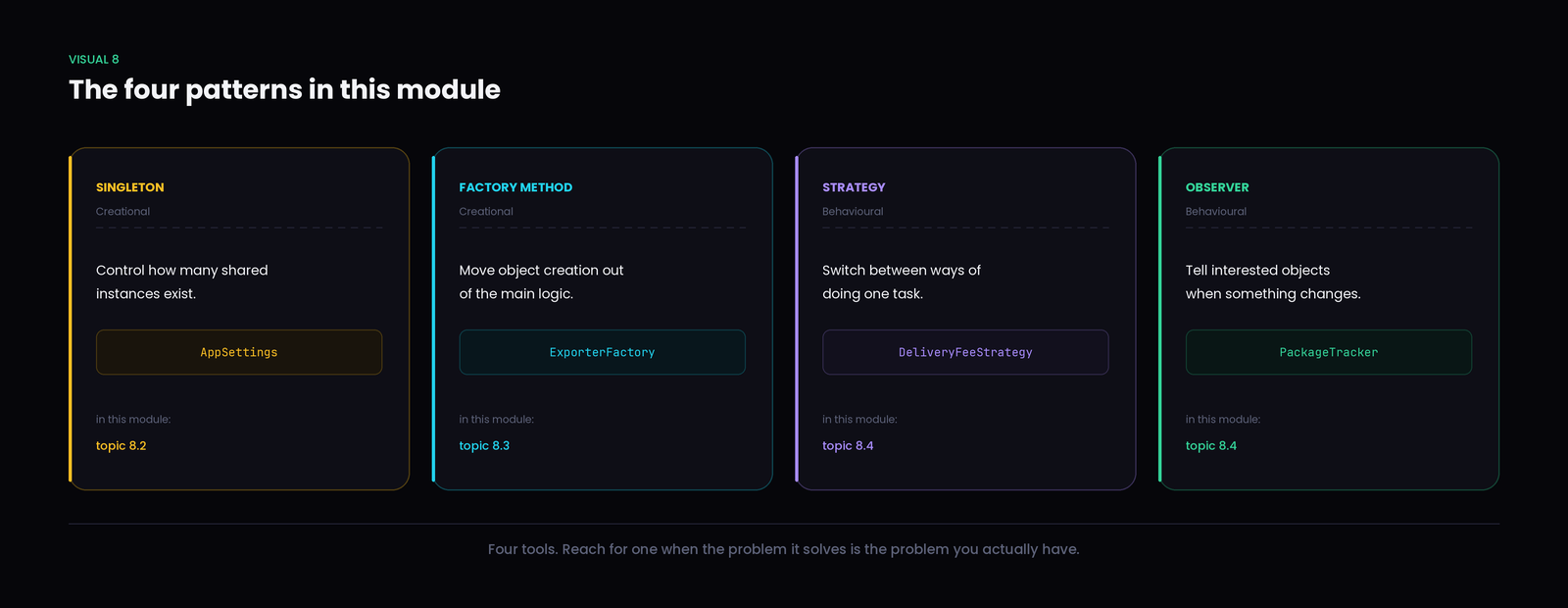
Design pattern — a reusable way of arranging objects to solve a problem that keeps coming back. A shape, not a library.
Singleton (creational) — one shared instance, when the design genuinely needs exactly one. Watch the testing cost.
Factory Method (creational) — move the decision about which object to build out of the code that uses it. A simple factory centralises that decision; Factory Method hands it to a subclass.
Strategy (behavioural) — put interchangeable ways of doing one job into separate objects, and swap them without touching the class that uses them.
Observer (behavioural) — let interested objects subscribe, and tell them all when something changes, without knowing what any of them do.
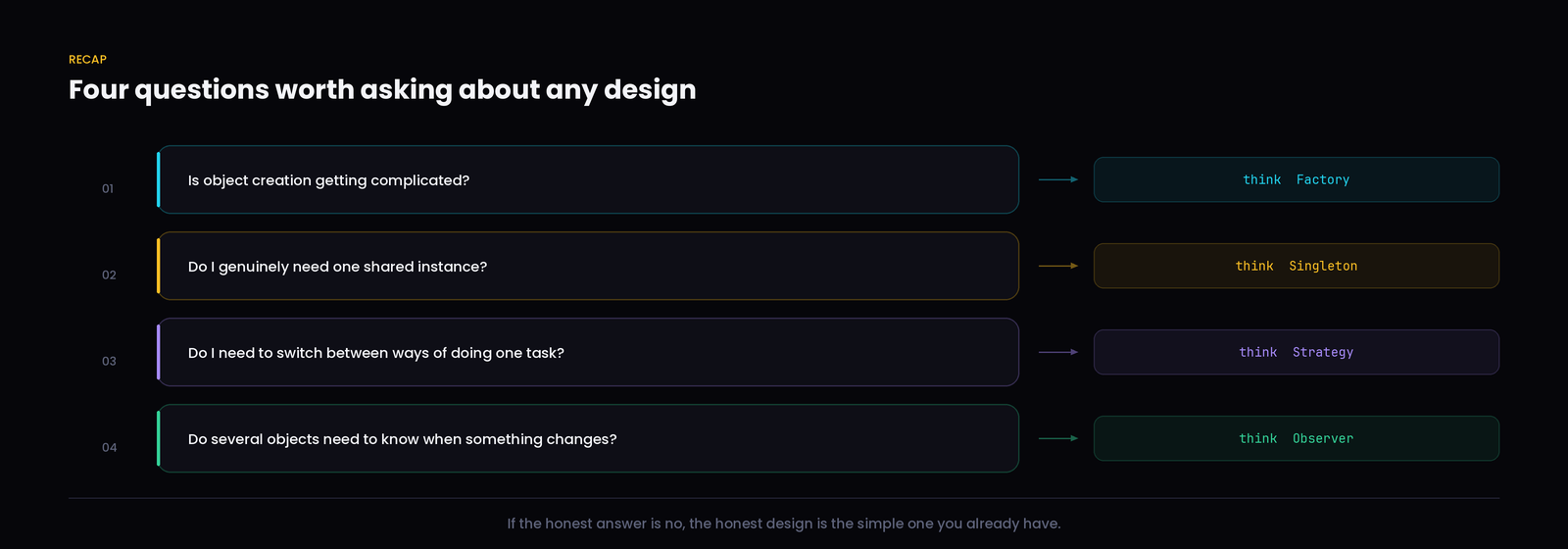
Remember — Patterns are worth learning because they name problems you will meet anyway. The skill being built here is not reciting four patterns — it is looking at a messy design and recognising which question it is really asking.
And knowing that sometimes the answer is: none of them.
- 1.
class GameSettings {
private:
    GameSettings() {}
public:
    static GameSettings& getInstance() {
        static GameSettings instance;
        return instance;
    }
    int volume = 50;
};

int main() {
    GameSettings& a = GameSettings::getInstance();
    GameSettings& b = GameSettings::getInstance();
    a.volume = 80;
    std::cout << b.volume << " " << (&a == &b);
}
What does this print?
- 2.
A music app must notify the now-playing bar, the lock screen widget and the listening-history logger whenever the track changes. The team expects more listeners later.
Which pattern fits best?
- 3.
class Report {
    SortStrategy& s;
public:
    Report(SortStrategy& st) : s(st) {}
    void build() { s.sort(); }
};
Which statement is accurate?
- 4.
A team writes a helper that returns
new PdfExporter(),new CsvExporter()ornew ExcelExporter()based on a string argument, and calls it the Factory Method pattern.What is the most accurate response?
- 5.
A 200-line tool reads one config file, converts it, writes one output file. A reviewer asks for a Singleton config, a factory for the converter, a strategy for formatting and an observer for progress messages.
What is the soundest reply?
The scenario
You are designing the core of a package delivery app. These pieces exist:
PackageTracker · CustomerApp · SmsNotifier · DeliveryDashboard · DeliveryFeeCalculator · StandardDelivery · ExpressDelivery · NotificationFactory
Around fifteen minutes. Reason about the design before writing anything — the goal is deciding which problem each pattern is solving, not fitting all four in.
Task 1. When a package status changes, what should happen, and which objects should hear about it?
Task 2. The company adds weekend delivery pricing. What should change, and what should not?
Task 3. Notifiers are picked from user preferences at run time — some users want SMS, some email, some push. Where should that object get created?
Task 4. Would a Singleton help anywhere here? Say yes or no, and why.
Hint — Ask each pattern's own question, and only use it if the honest answer is yes.
Who needs to know something changed? → Observer. Which of several ways should I do this one job? → Strategy. Is deciding which object to build getting scattered? → Factory. Would a second instance genuinely cause a bug? → Singleton.
A possible solution
Observer, for status updates. Everything that reacts implements one interface:
class Observer {
public:
    virtual void onStatusChange(std::string status) = 0;
    virtual ~Observer() = default;
};

class CustomerApp : public Observer {
public:
    void onStatusChange(std::string s) override { std::cout << "  App: " << s << "\n"; }
};

class DeliveryDashboard : public Observer {
public:
    void onStatusChange(std::string s) override { std::cout << "  Dashboard: " << s << "\n"; }
};
The tracker keeps a list and broadcasts:
class PackageTracker {
public:
    void subscribe(Observer* o) { watchers.push_back(o); }
    void setStatus(std::string s) {
        std::cout << "Status -> " << s << "\n";
        for (Observer* o : watchers) o->onStatusChange(s);
    }
private:
    std::vector<Observer*> watchers;
};
Strategy, for the fee. One formula chosen at a time:
class DeliveryFeeStrategy {
public:
    virtual double calculate(double distance) = 0;
    virtual ~DeliveryFeeStrategy() = default;
};

class StandardDelivery : public DeliveryFeeStrategy {
public:
    double calculate(double d) override { return d * 5; }
};

class ExpressDelivery : public DeliveryFeeStrategy {
public:
    double calculate(double d) override { return d * 8; }
};

class DeliveryFeeCalculator {
    DeliveryFeeStrategy& strategy;
public:
    DeliveryFeeCalculator(DeliveryFeeStrategy& s) : strategy(s) {}
    double feeFor(double distance) { return strategy.calculate(distance); }
};
Factory, for notifiers — because the channel comes from user preferences and isn't known until run time. Notifiers are observers too, so the factory returns one:
class SmsNotifier : public Observer {
public:
    void onStatusChange(std::string s) override { std::cout << "  SMS: " << s << "\n"; }
};

Observer* createNotifier(std::string channel) {
    if (channel == "sms")   return new SmsNotifier();
    if (channel == "email") return new EmailNotifier();
    return nullptr;
}
Putting it together:
CustomerApp       app;
DeliveryDashboard dash;
Observer*         sms = createNotifier("sms");

PackageTracker tracker;
tracker.subscribe(&app);
tracker.subscribe(&dash);
tracker.subscribe(sms);

ExpressDelivery       express;
DeliveryFeeCalculator calc(express);
std::cout << "Fee for 10 km: " << calc.feeFor(10) << "\n";

tracker.setStatus("Out for delivery");
delete sms;
Fee for 10 km: 80
Status -> Out for delivery
  App: Out for delivery
  Dashboard: Out for delivery
  SMS: Out for delivery
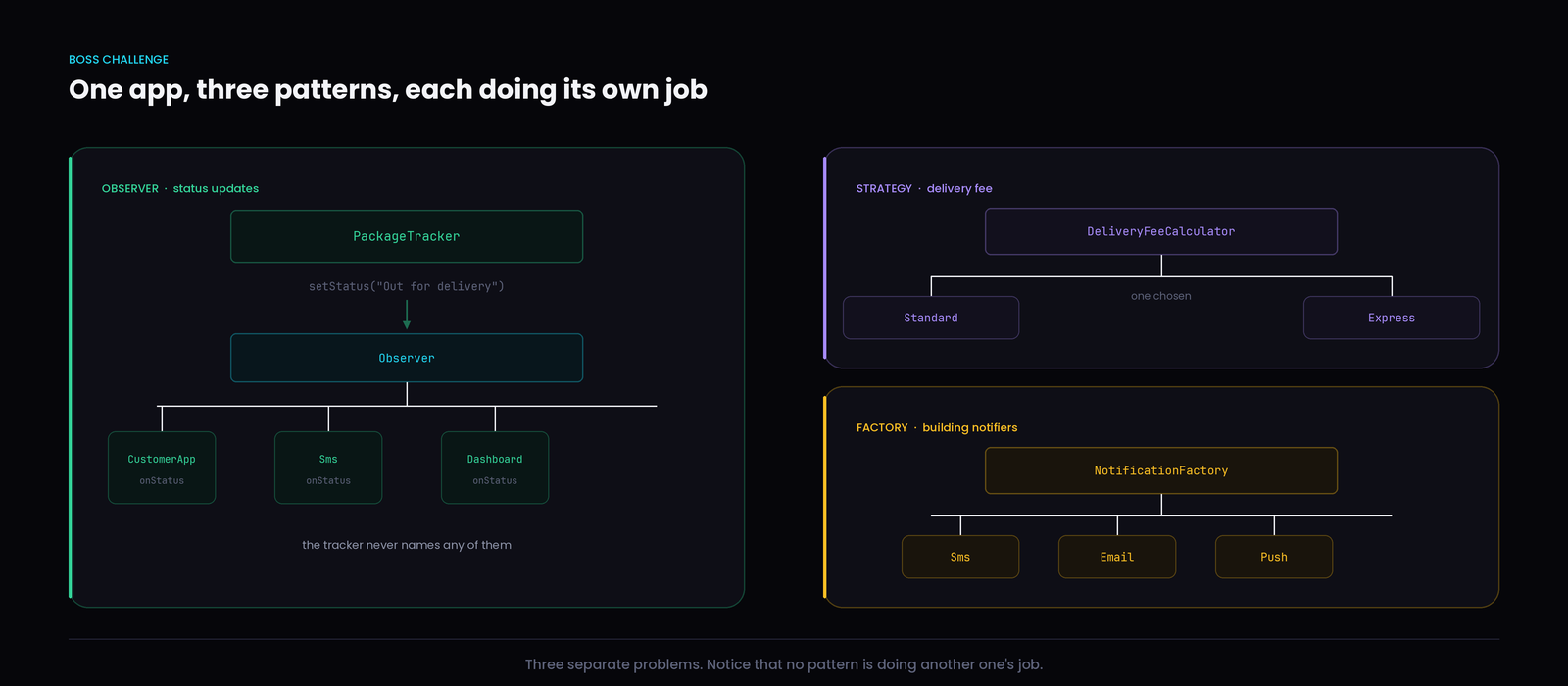
The answers
| Task | Answer |
|---|---|
| 1 — status changes | PackageTracker broadcasts to its subscriber list. The app, dashboard and any notifier hear it; the tracker names none of them. |
| 2 — weekend pricing | Add WeekendDelivery implementing the strategy interface. DeliveryFeeCalculator is not touched, and neither are the existing formulas. |
| 3 — notifier creation | In the factory. The channel is a run-time choice, and keeping it in one place stops that conditional from spreading through the app. |
| 4 — Singleton | Probably not. Nothing here breaks if a second PackageTracker or calculator exists, and each package genuinely needs its own tracker. Forcing one would be a bug, not a feature. |
Remember — Task 4 is the most important one. Three patterns earned their place because each answered a real question. The fourth did not, and leaving it out is the correct design decision — not a gap in the solution.